

Aircraft Maneuver and Parking Stand Simulation and Visualization
The preferred choice of airport designers, planners and operators around the world, AviPLAN® is the complete CAD software solution for safe and accurate airside planning and design. Whether you are considering near-term scenarios or master planning, AviPLAN lets you plan with confidence. Use it to revise apron layouts, develop complex stands with multiple boarding bridges, design taxiways and fillets and to generate detailed nose-gear or cockpit ground markings. It also allows you to perform safety clearance, jet blast impact, or operational efficiency studies.
There are four AviPLAN products ─ from the comprehensive AviPLAN Airside Pro to AviPLAN Turn. The software suits all requirements, from busy, multi-fleet international airports that accommodate intercontinental flights to smaller regional airports. All products feature an extensive library of passenger, cargo and military airplanes and helicopters, plus ground support vehicles, modeled according to manufacturer specifications. A library of passenger boarding bridges for designing your own contact or remote stands is also available in AviPLAN Airside and Airside Pro.

Advanced aircraft maneuver and parking stand simulation and visualization.



Platform Compatibility
We strive to keep our products compatible with the latest operating systems and platforms. Find the latest product compatibility information for Transoft products.
English
What Makes AviPLAN Unique
Save design time
Using the easy-to-use graphical interface, simply overlay AviPLAN simulations on top of your existing CAD airport drawing to quickly test whether your design will accommodate safe aircraft and vehicle maneuvers from runway to gate. AviPLAN generates accurate movements based on inputs, including variations in speed and steering angle (even in reverse), and different types of turns. It will also automatically follow identified nose gear or cockpit ground markings.
Depend on accurate results
AviPLAN’s library incorporates the most up-to-date manufacturer information on a range of aircraft, including dimensions, capabilities, jet blast data, and other specifications. The library also contains a broad spectrum of ground support vehicles, and in the case of AviPLAN Airside and Airside Pro, an array of passenger boarding bridges. You can also create your own custom vehicles. With Transoft’s well-established, validated algorithms, you can trust you are seeing the precise, true-to-life results of aircraft and vehicle maneuvers on the ground. In fact, manufacturers often use AviPLAN to test the capabilities of their equipment.
Drive operational efficiencies
Airports rely on making the most of their available airside space while ensuring safe and efficient movement of aircraft, service vehicles, passenger boarding bridges and passengers. AviPLAN allows you to precisely plan and simulate safe aircraft maneuvers from runway to gate as well as the placement and staging of service equipment. The result—efficient operations that minimize impact on the environment while maximizing the bottom line.
View important details
AviPLAN clearly displays the details you need to see: aircraft paths (nose and main gear, cockpit, engines and wingtips), safety clearance envelopes, and jet blast velocity contours and impact areas for various thrust levels. Safety clearance guidelines from ICAO, FAA and EASA are also included in the software.
Features
Ramp up Design Efficiency
User-friendly features allow you to easily design layouts that safely maximize capacity and improve flow. You can then test airside procedures with simulations that accurately replicate aircraft and ground support vehicle movement. Extensive libraries include a complete range of aircraft, service vehicles, and passenger boarding bridges, all modelled to the most current manufacturer specifications. There are four AviPLAN products — from the comprehensive AviPLAN Airside Pro to AviPLAN Turn.
- Choose from a library of aircraft and vehicles
- Simulate aircraft and ground vehicle maneuvers
- Analyze aircraft pushback operations
- Plan seamless aircraft loading and servicing
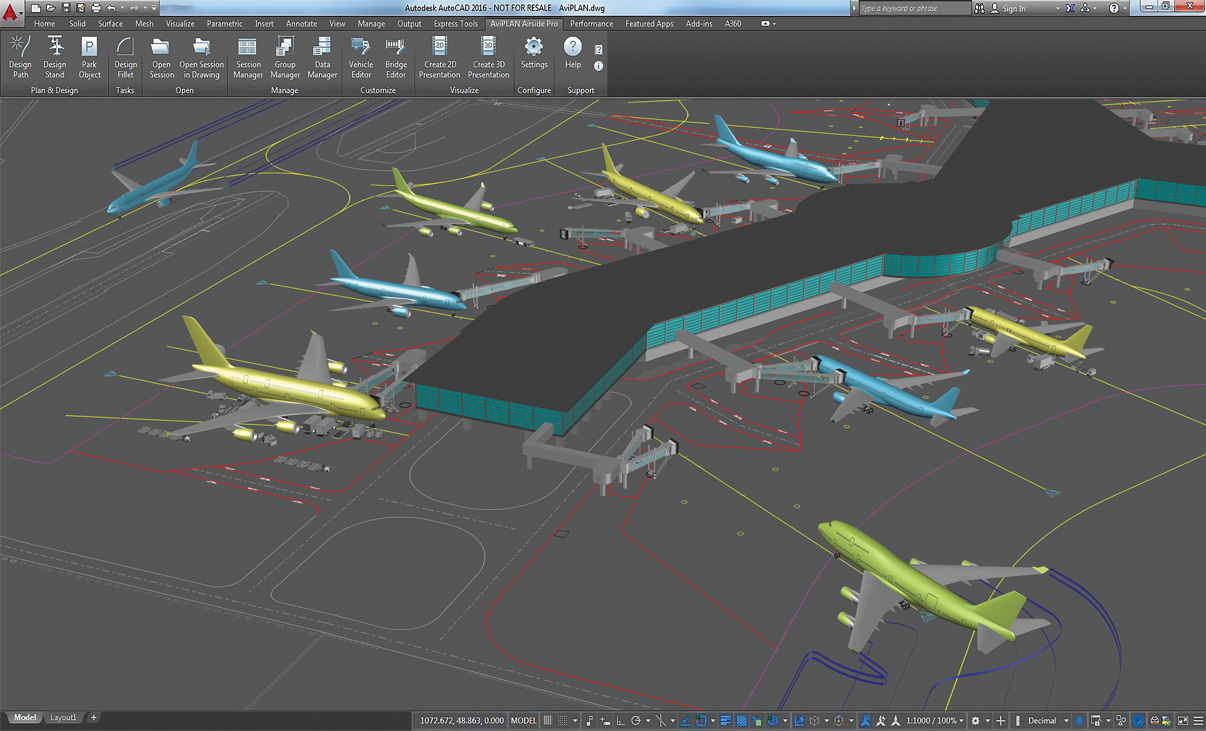
Reporting and Visualization
Convert technical aircraft maneuver and docking simulation analyses into professional movies in 2D and 3D. Ideal for visualizing complex technical results, illustrating capacity issues or simply adding credit to a stakeholder pitch.
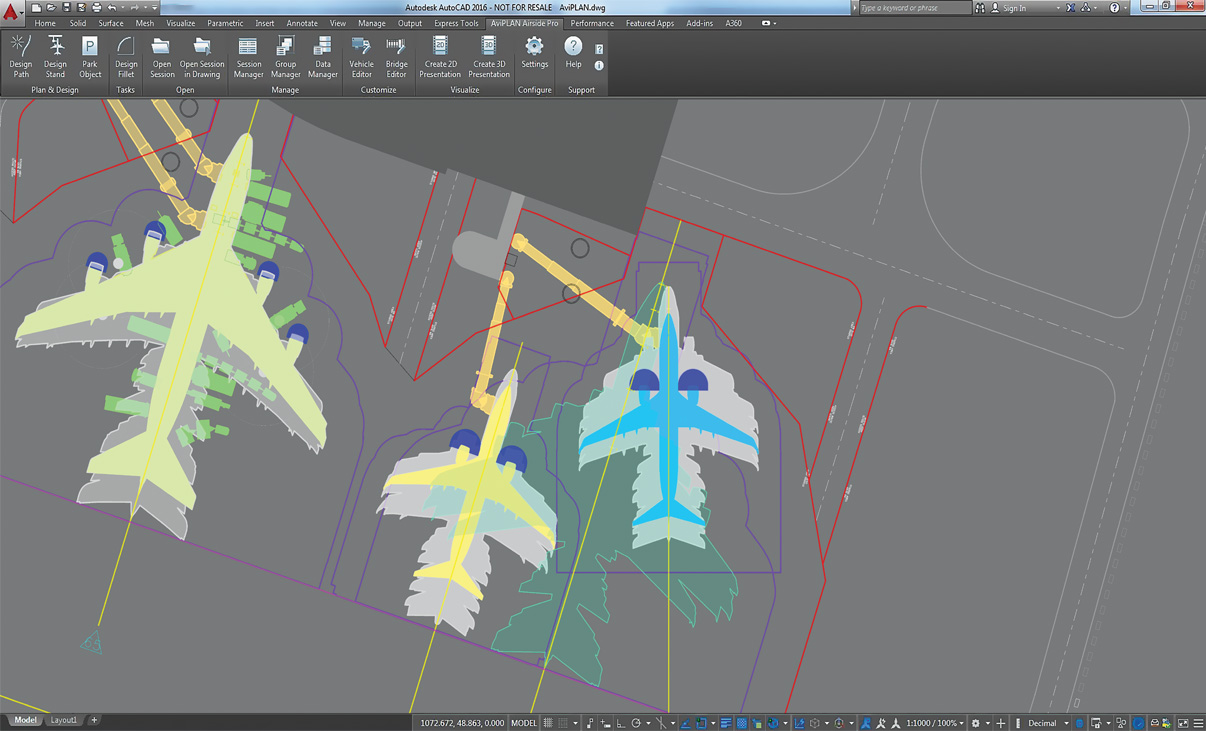
Complex Docking Scenarios
Plan intricate MARS stands, with multiple lead-in lines and passenger boarding bridges, with the guidance of warnings which indicate when design parameters are nearing, or exceed, limits.
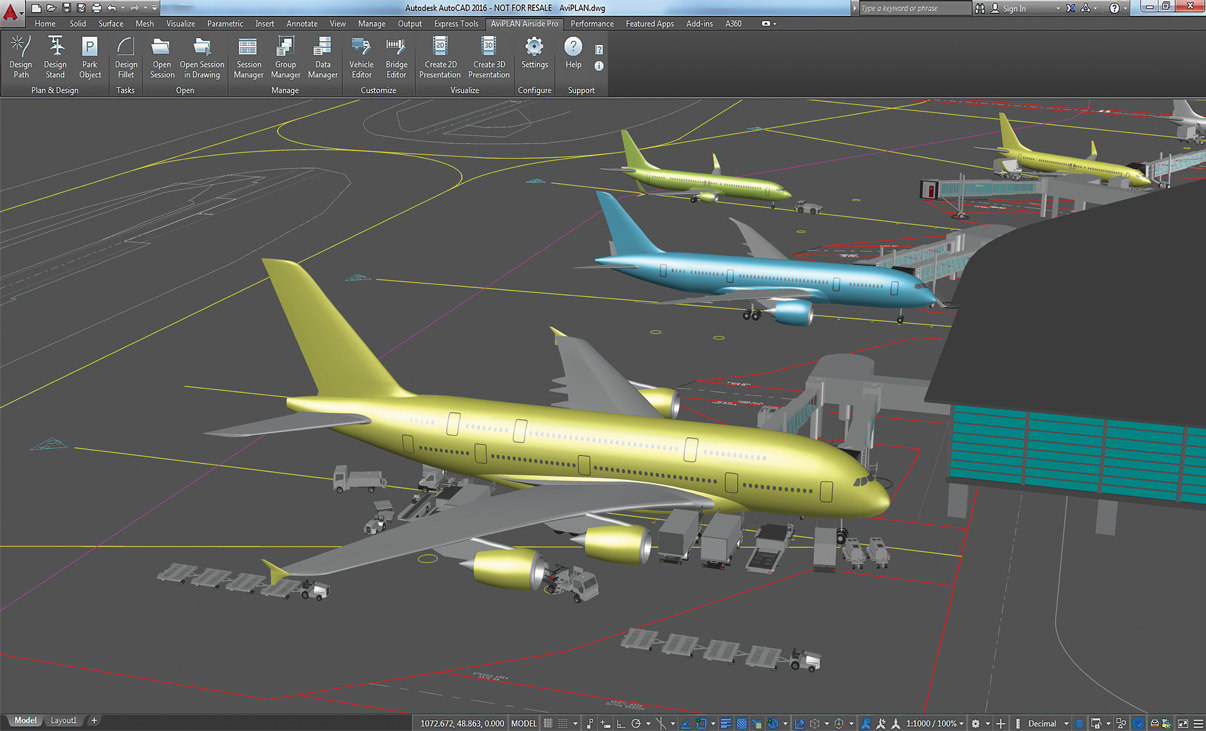
Intelligent Stand Planning
Leverage advanced optimization functionality to plan contact and non-contact stands in an unrivalled level of detail.
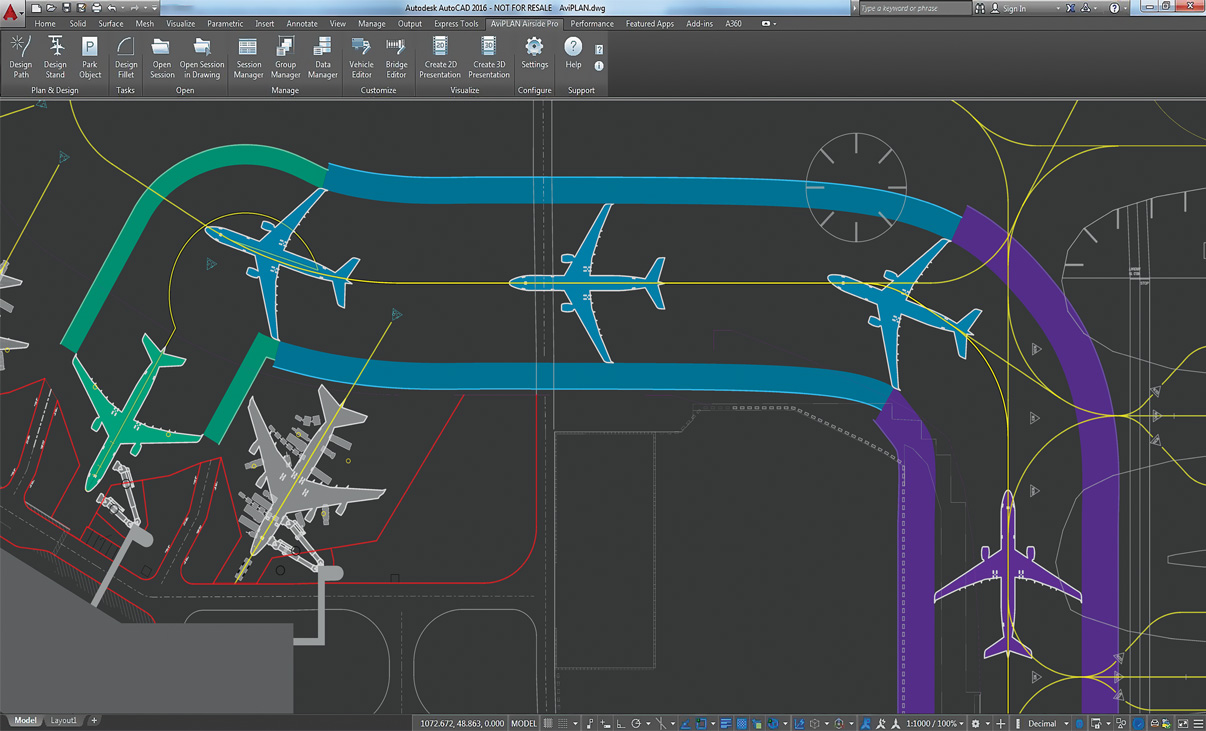
Airside Design Standards
Undertake clearance studies using taxi way, taxi lane and apron safety clearance guidelines from ICAO, FAA (ADG and TDG) and EASA.
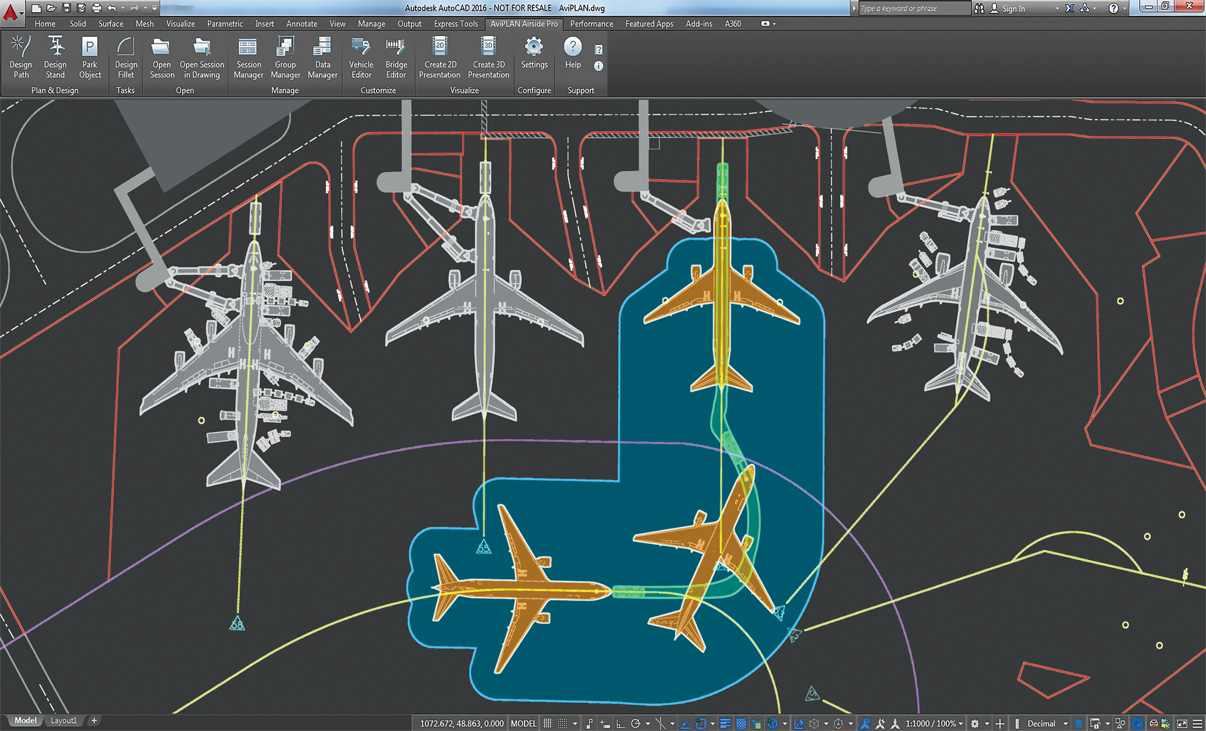
Accurate Pushback Maneuvers
The dependable path simulation algorithm allows users to accurately simulate complex airplane-towbar/towbarless tractor pushback maneuvers in 2D and 3D, for defining new or verifying existing operational procedures.
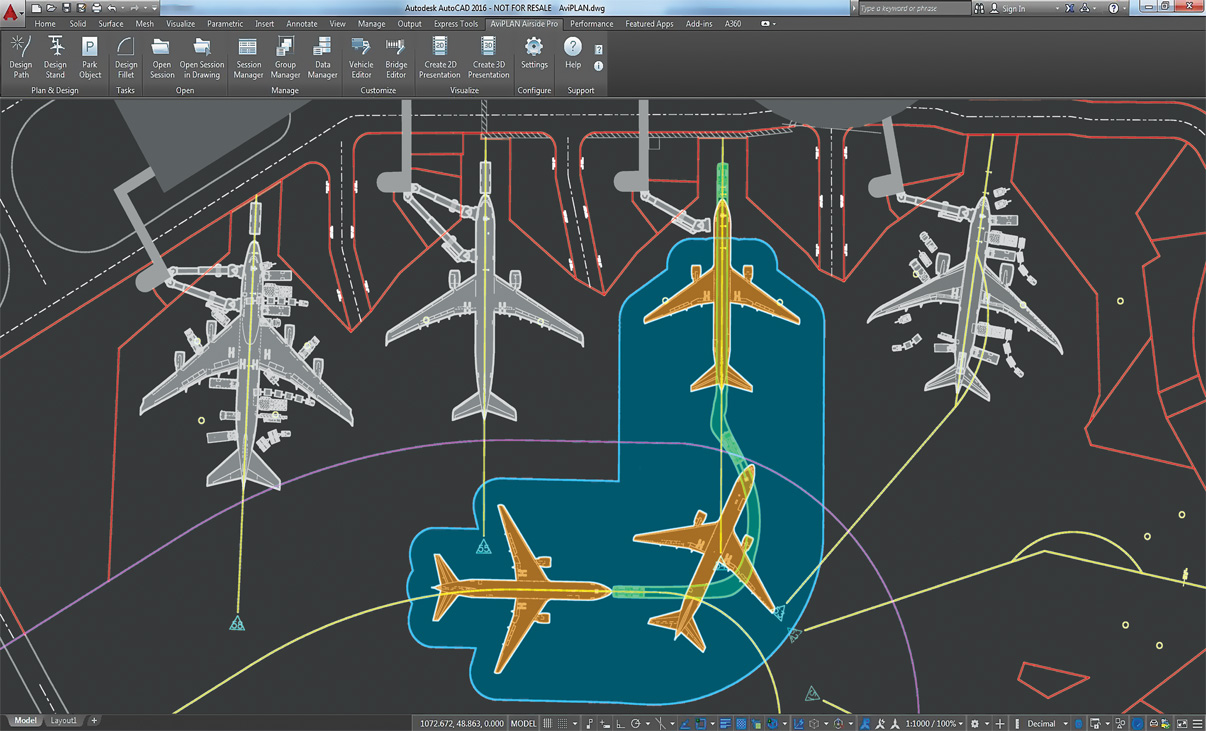
Accurate Pushback Maneuvers
The dependable path simulation algorithm allows users to accurately simulate complex airplane-towbar/towbarless tractor pushback maneuvers, for defining new or verifying existing operational procedures
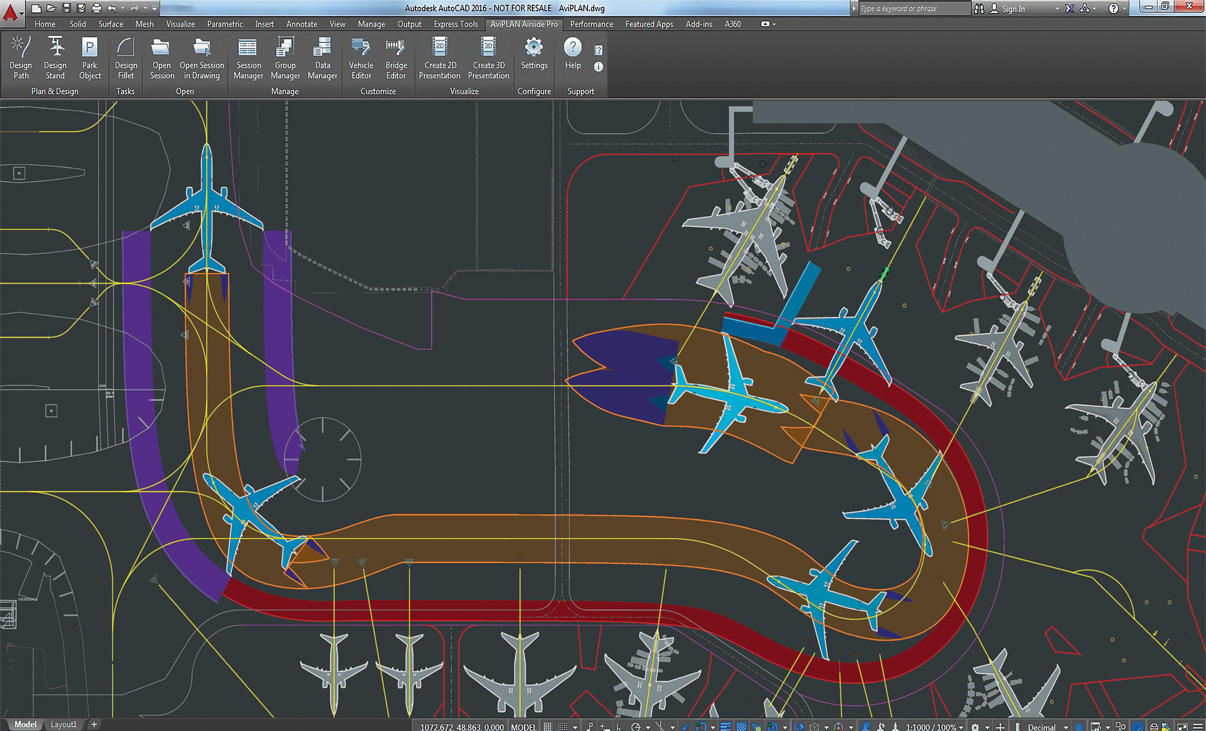
Safe Aircraft Maneuvering
Powerful maneuver simulation tools allow users to define and adjust parameters such as aircraft/vehicle type, turn types and angles, construction points and offsets, speeds and much more „on the fly“.
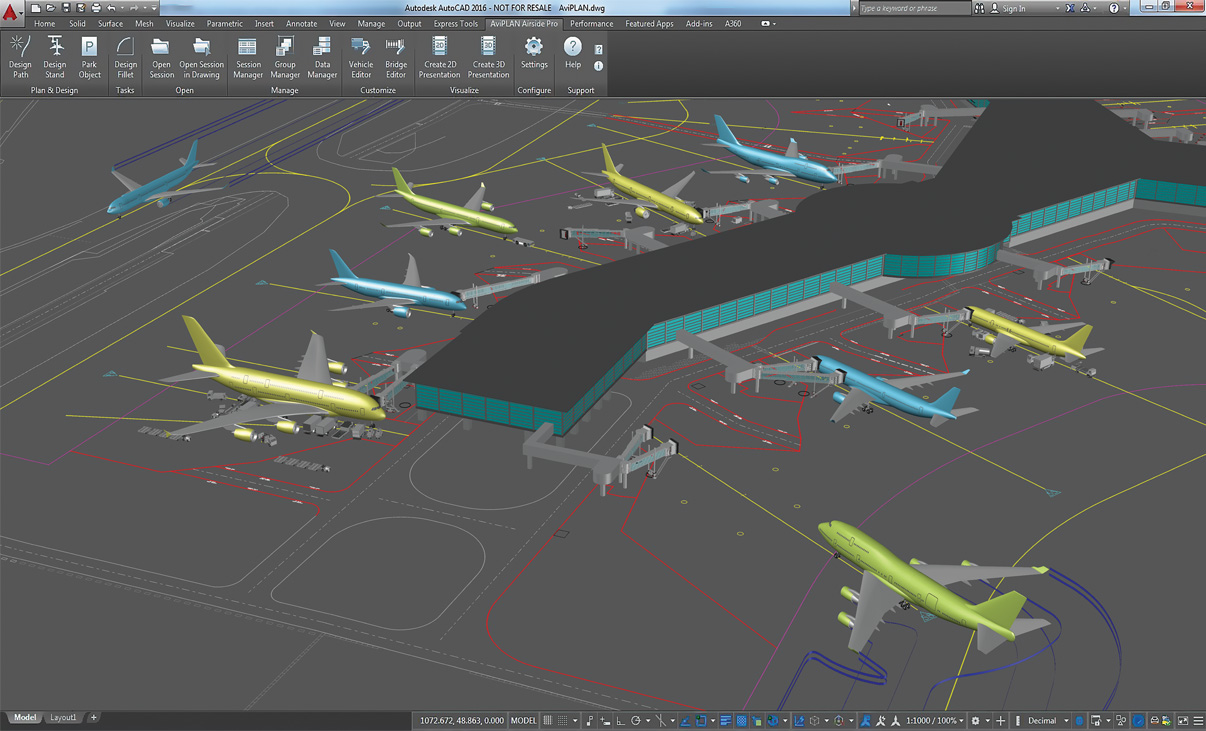
Reporting and Visualization
Convert technical aircraft maneuver and docking simulation analyses into professional movies in 2D and 3D. Ideal for visualizing complex technical results, illustrating capacity issues or simply adding credit to a stakeholder pitch.
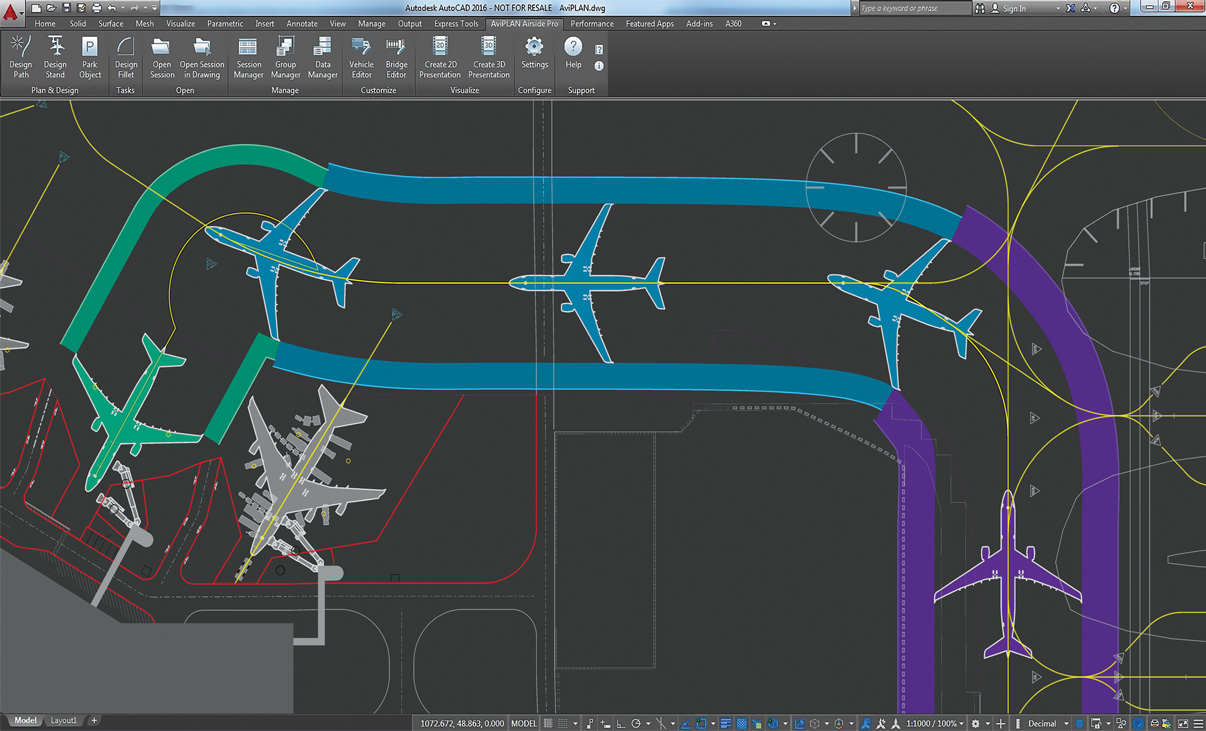
Airside Design Standards
Undertake clearance studies using taxi way, taxi lane and apron safety clearance guidelines from ICAO, FAA (ADG and TDG) and EASA.
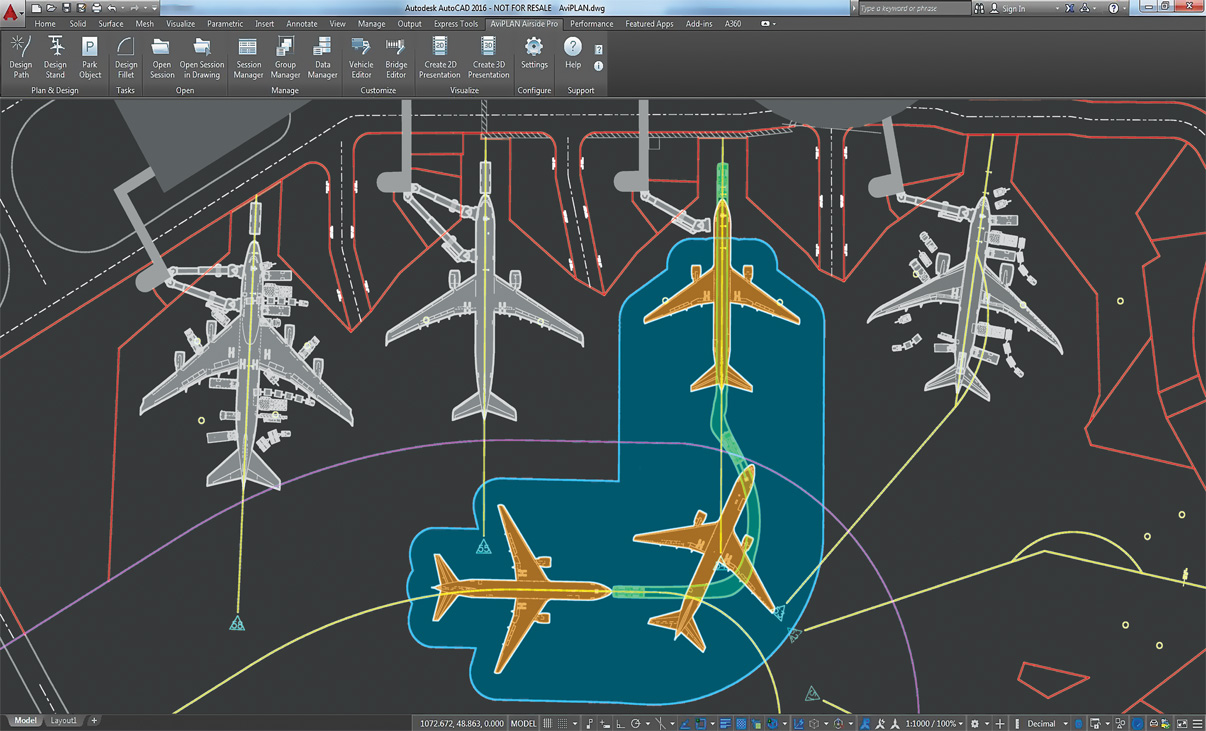
Accurate Pushback Maneuvers
The dependable path simulation algorithm allows users to accurately simulate complex airplane-towbar/towbarless tractor pushback maneuvers in 2D and 3D, for defining new or verifying existing operational procedures.
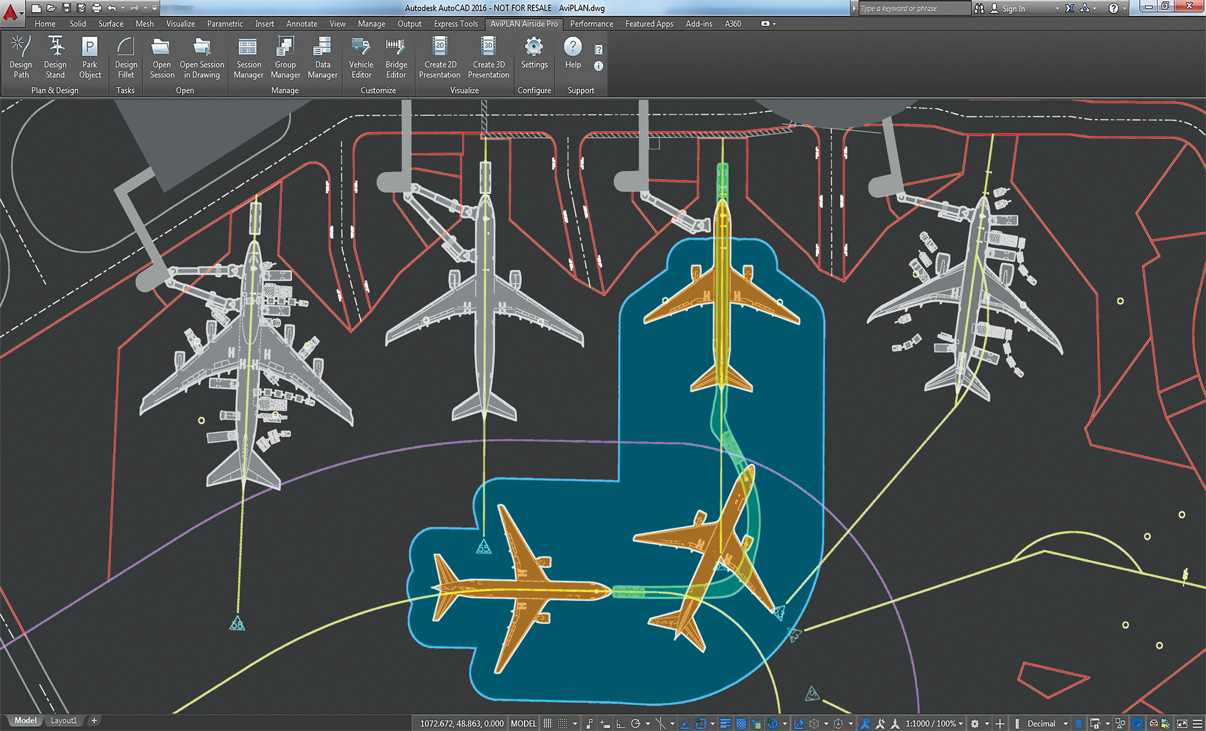
Accurate Pushback Maneuvers
The dependable path simulation algorithm allows users to accurately simulate complex airplane-towbar/towbarless tractor pushback maneuvers in 2D and 3D, for defining new or verifying existing operational procedures.
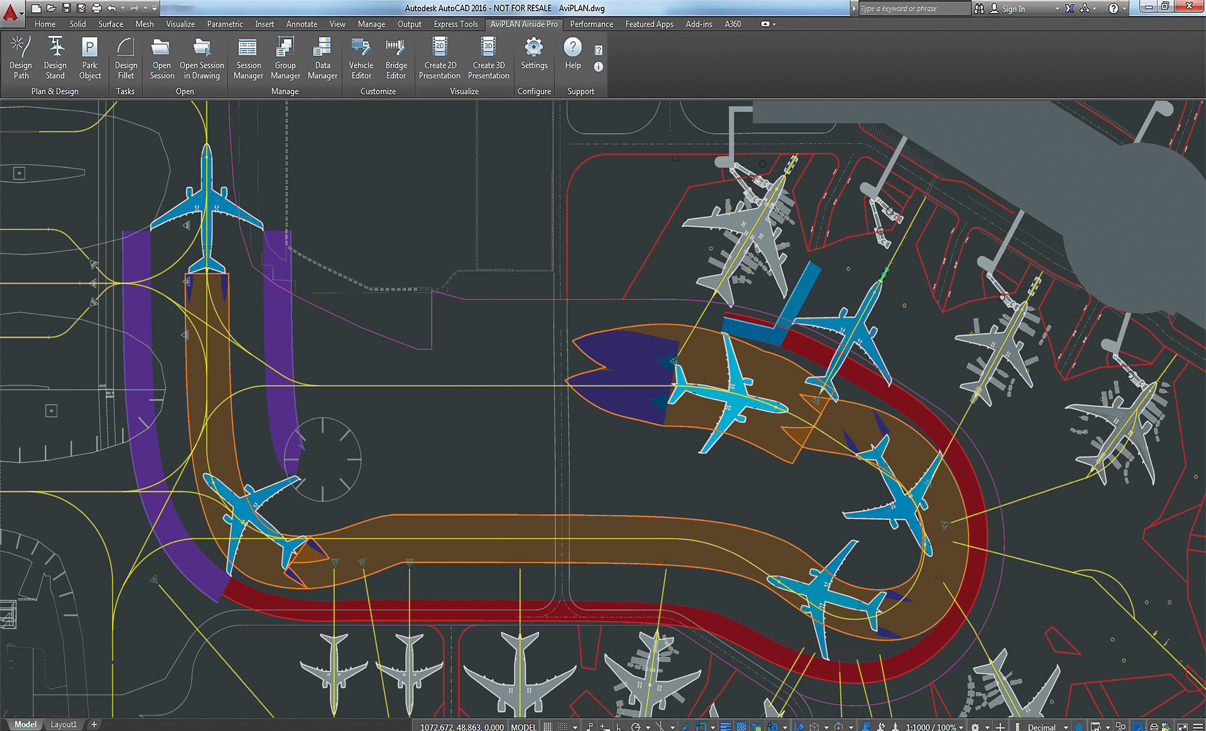
Safe Aircraft Maneuvering
Powerful maneuver simulation tools allow users to define and adjust parameters such as aircraft/vehicle type, turn types and angles, construction points and offsets, speeds and much more „on the fly“.
What’s New in AviPLAN
New features, fixes, and other improvements built specifically with your feedback.
General
- AviPLAN is now compatible with AutoCAD and Civil 3D 2025.
Feature updates
- It’s now possible to dynamically display nose gear angle limits and usage during Path creation.
- A new footer/status bar has been added to the Stand command dialog, showing the count of airplanes with docking, and also if there are any warnings.
- When using Drawing Manager, in sessions with multiple airplanes, aircraft that are not displayed are now indicated in blue in the session column.
- For Object Selection, it is now possible to name and save filter and column configurations for easy repeated use.
This latest version is launched as AviPLAN 2024 as Transoft Solutions is adopting a new annual product versioning system. This new approach makes it easier to understand which version you are running to help ensure that you stay up to date with the latest features, improvements, and security patches.
Key features in this new release are:
- The new group lead-in command tool that saves you time by allowing rapid analysis of lead-in paths for all airplanes planned to use a stand, in just one single action.
- Integration of the service editor with the session manager to permit more heads-up planning.
- The new pilot ground blind spot element which assists in the placement of stand and taxiway markings.
- Improved capabilities for planning helicopter and VTOL parking at airports.
- UI enhancements for faster, more efficient workflows.
- A new data export connection to our recently-launched cloud-native platform AeroCENTRAL, which aims to bridge the gap between airside planning and operations.
- Refined and expanded conflict analysis – Now with apron safety line detection making it simpler to check regulation compliance at the stand and report to authorities.
- VTOL ready! – With the VTOL (vertical take-off and landing) aircraft now added to the AviPLAN library, simulate and design vertiports that are compliant with preliminary EASA and FAA guidelines on vertiport design.
New rotation option – Achieve flexible movement and rotation of stand lead-in lines around user-defined point or origin. - Improved TaxiBot path simulation – More accurately model pushback operations and procedures performed by this newer type of airplane mover.
- Plus much more – Improved user features, including new display settings for the stand airplane cloud, stand adjacency conflicts, and platform compatibility updates.
- Compatibility with Autodesk AutoCAD® and Civil 3D® 2023
- The latest FAA AC 150/5300-13B regulations (March 2022)
- The latest EASA CS-ADR-DSN Issue 6 regulations (March 2022)
- Improved regulation/session migration support and user feedback
- Stand | New airplane isolation/highlight function to expedite the iterative design process
- Fillet | New automatic selection of the airplanes’ longest effective wheelbase
- Group Manager | New functionality to add airplanes to groups by selecting existing sessions
- New and revised library objects and data from Airbus, Boeing, Gulfstream, TLD and more
- Latest ICAO Annex 14 Volume 1 8th Edition (Amendment 16) regulations
- Smart new features to start and complete tasks more quickly
- Totally overhauled tool for configuring passenger boarding bridges
- Algorithm refinements to improve usability and results
- New drawing options for taxiway and ground marking design
- Windows Media Video 9 support for movie creation
- New platform compatibility with Bricsys BricsCAD® V22
Licensing Options
Transoft offers a range of licensing options to help small, sole proprietorships right on up to the largest multinational organizations meet their transportation design and analysis needs.
Die Benutzerabonnementlizenz ist ein Modell, bei dem eine bestimmte Anzahl von abonnierten Benutzern über ihre eindeutigen Logins für die Dauer der Lizenzlaufzeit einen dedizierten Zugriff auf die Software erhält. Die Software kann von einem abonnierten Benutzer auf mehreren Arbeitsplätzen installiert und verwendet werden.
Jeder abonnierte Benutzer entspricht einer Person mit Kennung und Passwort, die nicht an andere Benutzer weitergegeben werden können. Die Softwareaktivierung ist ein einfacher Prozess und kann über das Internet vorgenommen werden.
Für wen ist das Benutzerabonnement geeignet?
Die Benutzer-Abonnementlizenz bietet eine kosteneffektive Möglichkeit für kleine Unternehmen, mit 1 Lizenz zu beginnen und ggf. weitere Benutzer hinzuzufügen. Größeren Unternehmen stellt sie über das My Transoft-Portal mehr Flexibilität bei der Benutzeradministration bereit. Sie bietet außerdem einfache Skalierbarkeit und Budgetierungsmöglichkeiten anhand der Anzahl der Benutzer entsprechend den jeweiligen Geschäftsanforderungen.
WICHTIGSTE VORTEILE EINES UPGRADES AUF DIE BENUTZER-ABONNEMENTLIZENZ
- Automatische Updates und neue Funktionen
Software-Updates, neue Funktionen und Fahrzeugbibliotheken sind wichtig, aber nicht immer kostenlos. Mit der User Subscription Lizenz erhalten Sie ohne zusätzliche Kosten automatisch Updates und Erweiterungen von Fahrzeugbibliotheken, Kompatibilitäts-Updates und Funktions-Upgrades.
- Skalierbarkeit und Lizenzverwaltung
Mit sich ändernden Unternehmensanforderungen kann sich auch die Anzahl der erforderlichen Softwarelizenzen ändern. Mit einer User Subscription Lizenz haben Sie wesentlich einfacher die Möglichkeit, jährlich neue Benutzer hinzuzufügen oder Lizenzen zu entfernen. Sie können auch Lizenzen anderen Benutzern zuzuweisen.
- Zugriff auf die Software von mehreren Computern
Greifen Sie auf Ihre Workstation, Ihren Laptop oder Ihren persönlichen Desktop zu.
- Kostenloser technischer Support
Sie erhalten umfassenden Support für alle Benutzer. Falls erforderlich, können Sie Support-Einzelsitzungen mit Produktexperten anfordern.
- Einladungen zu Webinaren
Sie können an unseren regelmäßigen produktorientierten Webinaren teilnehmen. Diese Live-Webinare bieten eine hervorragende Möglichkeit zu erfahren, wie unsere Software Ihnen helfen kann, Ihre Planungsprozesse zu optimieren und gleichzeitig Projektkosten zu senken.
- Flexible Benutzer-Lizenzierungsoptionen
Sie können zwischen Einzel- und Mehrbenutzerpaketen wählen und so Ihre Lizenzen an Ihre Anforderungen einfach anpassen. Umfassende Details erfahren Sie von unserem Vertriebsteam.
- Einfache Benutzerverwaltung
Die Benutzerverwaltung kann im My Transoft Portal, über Einladungslinks oder über Identity Provider Single Sign-on mit User Provisioning erfolgen.
Team Subscription License (TSL) ist eine Lizenzoption, die für gelegentliche Benutzer der Software gedacht ist. Die Größe einer Team Subscription License wird durch die Anzahl der zuweisbaren Plätze dargestellt.
Warum sollten Sie die Team Subscription License Option wählen?
Während User Subscription Licenses (USL) besser für dedizierte Nutzer geeignet sind, können Team Subscription Licenses eine gute Ergänzung dazu sein, wenn Ihr Unternehmen gelegentliche, weniger intensive Nutzer der Software hat.
Wie es funktioniert
Jeder Benutzer einer Team Subscription Lizenz muss ein Konto im My Transoft Portal haben, um eine Lizenz anzufordern. Für diesen Vorgang ist ein Internetzugang erforderlich.
Wenn ein Endbenutzer das Softwareprodukt auf seiner Workstation startet, stellt die Software eine Verbindung zum My Transoft Portal her und ermittelt, ob ein Platz verfügbar ist. Ist dies der Fall, wird dem Endbenutzer für einen Zeitraum von 24 Stunden ein Platz zugewiesen, auf den er dann uneingeschränkt zugreifen kann. Nach Ablauf der 24 Stunden verfällt der zugewiesene Platz automatisch und ein anderer Nutzer kann ihn beanspruchen.
Sobald alle Team Subscription License Seats zu einem bestimmten Zeitpunkt zugewiesen sind, kann kein anderer Endnutzer diese Lizenz nutzen, bis der 24-Stunden-Zeitraum abgelaufen ist und einer der Seats automatisch freigegeben wird.
DIE WICHTIGSTEN VORTEILE DER TEAM-ABONNEMENT-LIZENZ
- Mehr Flexibilität für Ihre Teammitglieder
Ermöglicht den Zugriff auf die Software für Gelegenheitsnutzer, ohne dass Sie für alle Nutzer spezielle Lizenzen ausgeben müssen
- Weniger Verwaltungsaufwand für die IT-Abteilung
Einfacher Zugriff auf die Software für Gelegenheitsnutzer, ohne dass die IT-Abteilung Lizenzen unter den Teammitgliedern zuweisen oder übertragen muss; Selbstverwaltung durch die Nutzer mit automatischer 24-Stunden-Sperre
- Kombinierte Team- und Benutzerabonnement-Option
Flexibilität beim Mischen von Plänen je nach den Bedürfnissen verschiedener Nutzertypen
- Automatische Updates, neue Funktionen und Inhalte
Fehlerkorrekturen, Kompatibilität, neue Versionen oder Fahrzeugrichtlinien sind automatisch für Sie verfügbar.
- Einfache Verwaltung Ihrer sich ändernden Geschäftsanforderungen
Mit verbesserter Skalierbarkeit und Benutzerverwaltung.
- Installieren Sie die Software und melden Sie sich von überall aus an
Greifen Sie mit Single Sign-on auf Ihre Workstation, Ihren Laptop oder Ihren persönlichen Desktop zu.
- Unbegrenzter technischer Support
Erhalten Sie erstklassige Unterstützung für alle Ihre Implementierungen und technischen Support-Anforderungen.
- Einladungen zu Webinaren mit Lernschwerpunkten
Nehmen Sie an lehrreichen Webinaren unserer Produktexperten teil und erfahren Sie, wie unsere Software zur Rationalisierung von Designprozessen beitragen kann.
- Einfache Benutzerverwaltung
Die Benutzerverwaltung kann im My Transoft Portal, über Einladungslinks oder über Identity Provider Single Sign-on mit User Provisioning erfolgen.
Transoft Support
We take pride in delivering complete customer satisfaction. Get help with products, downloads, technical support, and more.

My Transoft Portal
Transoft's product enhancements are periodically released to provide access to new features, fixes, and security updates. For many products, you can find these updates and download them directly from My Transoft Portal.

Software License Agreement
For information on terms and conditions detailing the usage of our software, please refer to Transoft’s Software License Agreement (SLA).

Software FAQ
Search our extensive product knowledgebase that address some of the most frequently asked questions regarding Transoft ‘s software.

Help Desk
Find answers to your issues on a variety of topics or request Technical Support. Get help with downloading and installing your software, managing your account, product compatibility and much more.

Licensing Options
Transoft offers a range of licensing options to help small, sole proprietorships right on up to the largest multinational organizations meet their transportation design and analysis needs.
Project Support Services
Need assistance with custom drawings and content creation related to your project design work? Transoft’s team of consultants can help. We deliver fast and helpful services for clients requesting additional assistance with drawings and simulations related to their project design work.
Compare
| AviPLAN Turn |
AviPLAN Turn Pro |
AviPLAN Airside |
AviPLAN Airside Pro |
|
|---|---|---|---|---|
Libraries |
||||
| Airplanes, helicopters and VTOLs | 2D | 2D & 3D | 2D | 2D & 3D |
| Pushback tractors and other service equipment | 2D | 2D & 3D | 2D | 2D & 3D |
| Passenger boarding bridges | 2D | 2D & 3D | ||
Customization |
||||
| Create custom vehicles | ✓ | ✓ | ✓ | ✓ |
| Define bridge-mounted services | ✓ | |||
Path |
||||
| Simulate aircraft and vehicle maneuvers | ✓ | ✓ | ✓ | ✓ |
| Follow CAD-lines or maneuver manually | ✓ | ✓ | ✓ | ✓ |
| Perform pushback and towing | ✓ | ✓ | ✓ | ✓ |
| Automated conflict detection | ✓ | ✓ | ||
Stand and Parking |
||||
| Park aircraft or vehicles | ✓ | ✓ | ✓ | ✓ |
| Design contact or remote stands | ✓ | ✓ | ||
| Specify bridge characteristics | ✓ | ✓ | ||
| Automate stop line creation | ✓ | |||
| Design with multiple bridges and lead-in lines | ✓ | |||
| Define airplane service installations | ✓ | |||
| Automated conflict detection | ✓ | |||
Airside Design |
||||
| Airplane and vehicle selection/sorting options | ✓ | ✓ | ✓ | ✓ |
| Automated taxiway intersection fillet design | ✓ | ✓ | ||
Display Elements |
||||
| Paths e.g. landing gear, engines, wing tips | ✓ | ✓ | ✓ | ✓ |
| Jet blast velocity contours and impact areas | ✓ | ✓ | ✓ | ✓ |
| ICAO, FAA, EASA or user-defined safety clearances | ✓ | ✓ | ✓ | ✓ |
| Airplane service points and service vehicles | ✓ | ✓ | ✓ | ✓ |
| In-ground service equipment incl. operational radius | ✓ | |||
Reporting |
||||
| Create text (.odt), spreadsheet (.csv) or in-drawing reports | ✓ | ✓ | ✓ | ✓ |
Animation and Visualization |
||||
| Animate aircraft and vehicle movements in CAD drawing | ✓ | ✓ | ✓ | ✓ |
| Create movie presentations with multiple simulations | ✓ | ✓ | ||
Data Management |
||||
| Export and share property templates for element display | ✓ | ✓ | ✓ | ✓ |
| Export and share custom objects | ✓ | ✓ | ✓ | ✓ |
| Import simulations from other drawings | ✓ | ✓ | ||
| Export and share simulations between CAD-platforms | ✓ | ✓ |
Training
We offer many excellent opportunities for you to take a more interactive approach in learning about our solutions. From webinars to how to videos, find what you need here.
AviPLAN Videos
Request a Quote
Thank you for your interest in AviPLAN. Fill out the form to receive information on purchasing and licensing options or if you have questions in general about the software.
On business days, you can expect a response within 24 hours of your request.