

Aircraft Maneuver and Parking Stand Simulation and Visualization
The preferred choice of airport designers, planners and operators around the world, AviPLAN® is the complete CAD software solution for safe and accurate airside planning and design. Whether you are considering near-term scenarios or master planning, AviPLAN lets you plan with confidence. Use it to revise apron layouts, develop complex stands with multiple boarding bridges, design taxiways and fillets and to generate detailed nose-gear or cockpit ground markings. It also allows you to perform safety clearance, jet blast impact, or operational efficiency studies.
There are four AviPLAN products ─ from the comprehensive AviPLAN Airside Pro to AviPLAN Turn. The software suits all requirements, from busy, multi-fleet international airports that accommodate intercontinental flights to smaller regional airports. All products feature an extensive library of passenger, cargo and military airplanes and helicopters, plus ground support vehicles, modeled according to manufacturer specifications. A library of passenger boarding bridges for designing your own contact or remote stands is also available in AviPLAN Airside and Airside Pro.

Advanced aircraft maneuver and parking stand simulation and visualization.



Platform Compatibility
We strive to keep our products compatible with the latest operating systems and platforms. Find the latest product compatibility information for Transoft products.
English
What Makes AviPLAN Unique
Save design time
Using the easy-to-use graphical interface, simply overlay AviPLAN simulations on top of your existing CAD airport drawing to quickly test whether your design will accommodate safe aircraft and vehicle maneuvers from runway to gate. AviPLAN generates accurate movements based on inputs, including variations in speed and steering angle (even in reverse), and different types of turns. It will also automatically follow identified nose gear or cockpit ground markings.
Depend on accurate results
AviPLAN’s library incorporates the most up-to-date manufacturer information on a range of aircraft, including dimensions, capabilities, jet blast data, and other specifications. The library also contains a broad spectrum of ground support vehicles, and in the case of AviPLAN Airside and Airside Pro, an array of passenger boarding bridges. You can also create your own custom vehicles. With Transoft’s well-established, validated algorithms, you can trust you are seeing the precise, true-to-life results of aircraft and vehicle maneuvers on the ground. In fact, manufacturers often use AviPLAN to test the capabilities of their equipment.
Drive operational efficiencies
Airports rely on making the most of their available airside space while ensuring safe and efficient movement of aircraft, service vehicles, passenger boarding bridges and passengers. AviPLAN allows you to precisely plan and simulate safe aircraft maneuvers from runway to gate as well as the placement and staging of service equipment. The result—efficient operations that minimize impact on the environment while maximizing the bottom line.
View important details
AviPLAN clearly displays the details you need to see: aircraft paths (nose and main gear, cockpit, engines and wingtips), safety clearance envelopes, and jet blast velocity contours and impact areas for various thrust levels. Safety clearance guidelines from ICAO, FAA and EASA are also included in the software.
Features
Ramp up Design Efficiency
User-friendly features allow you to easily design layouts that safely maximize capacity and improve flow. You can then test airside procedures with simulations that accurately replicate aircraft and ground support vehicle movement. Extensive libraries include a complete range of aircraft, service vehicles, and passenger boarding bridges, all modelled to the most current manufacturer specifications. There are four AviPLAN products — from the comprehensive AviPLAN Airside Pro to AviPLAN Turn.
- Choose from a library of aircraft and vehicles
- Simulate aircraft and ground vehicle maneuvers
- Analyze aircraft pushback operations
- Plan seamless aircraft loading and servicing
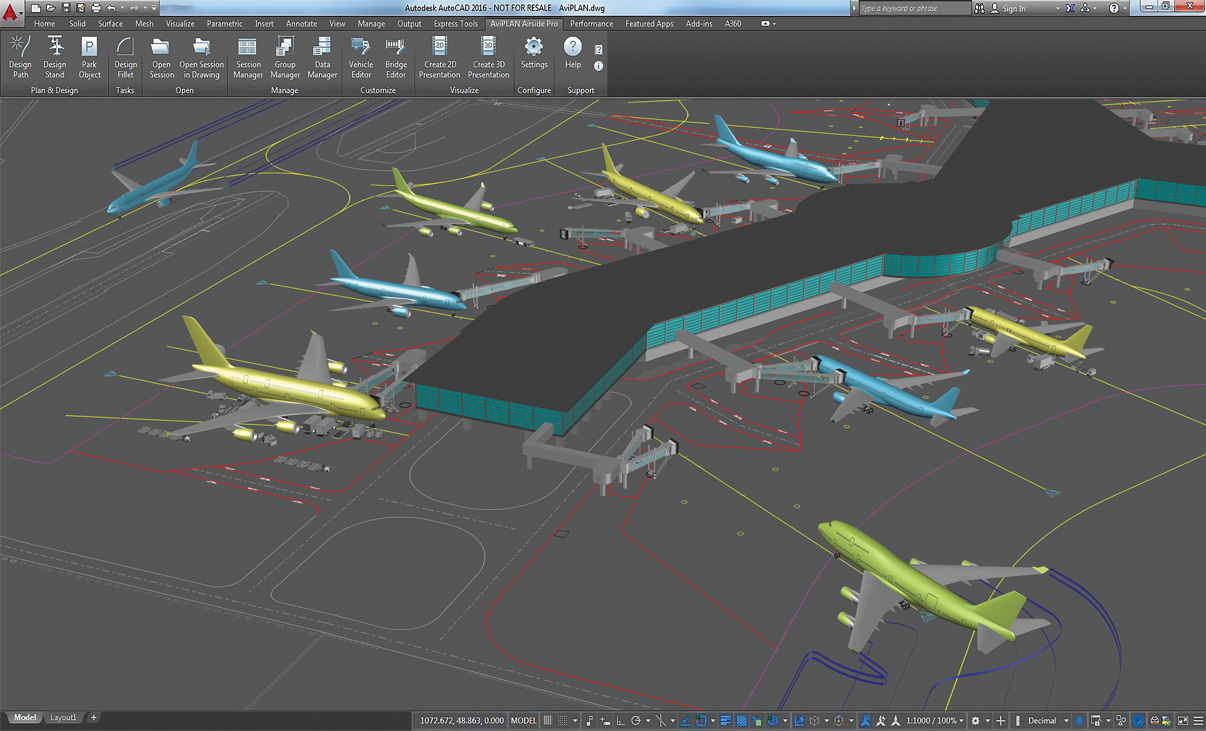
Reporting and Visualization
Convert technical aircraft maneuver and docking simulation analyses into professional movies in 2D and 3D. Ideal for visualizing complex technical results, illustrating capacity issues or simply adding credit to a stakeholder pitch.
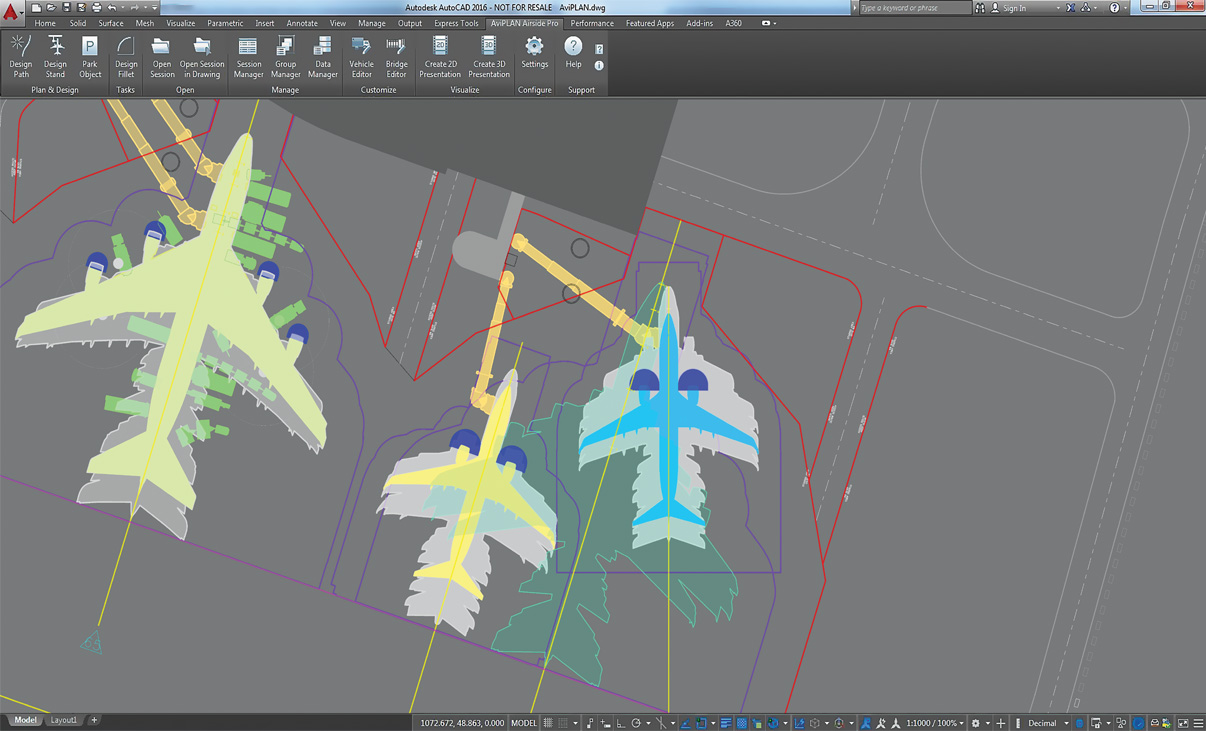
Complex Docking Scenarios
Plan intricate MARS stands, with multiple lead-in lines and passenger boarding bridges, with the guidance of warnings which indicate when design parameters are nearing, or exceed, limits.
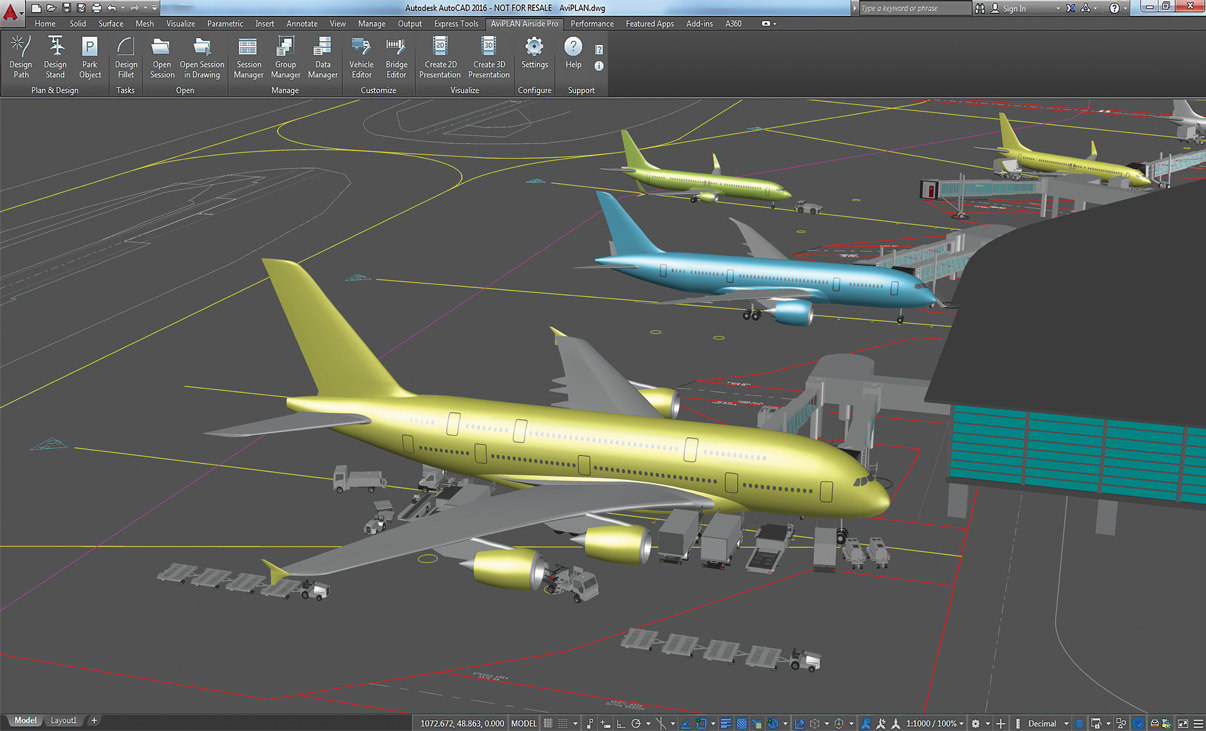
Intelligent Stand Planning
Leverage advanced optimization functionality to plan contact and non-contact stands in an unrivalled level of detail.
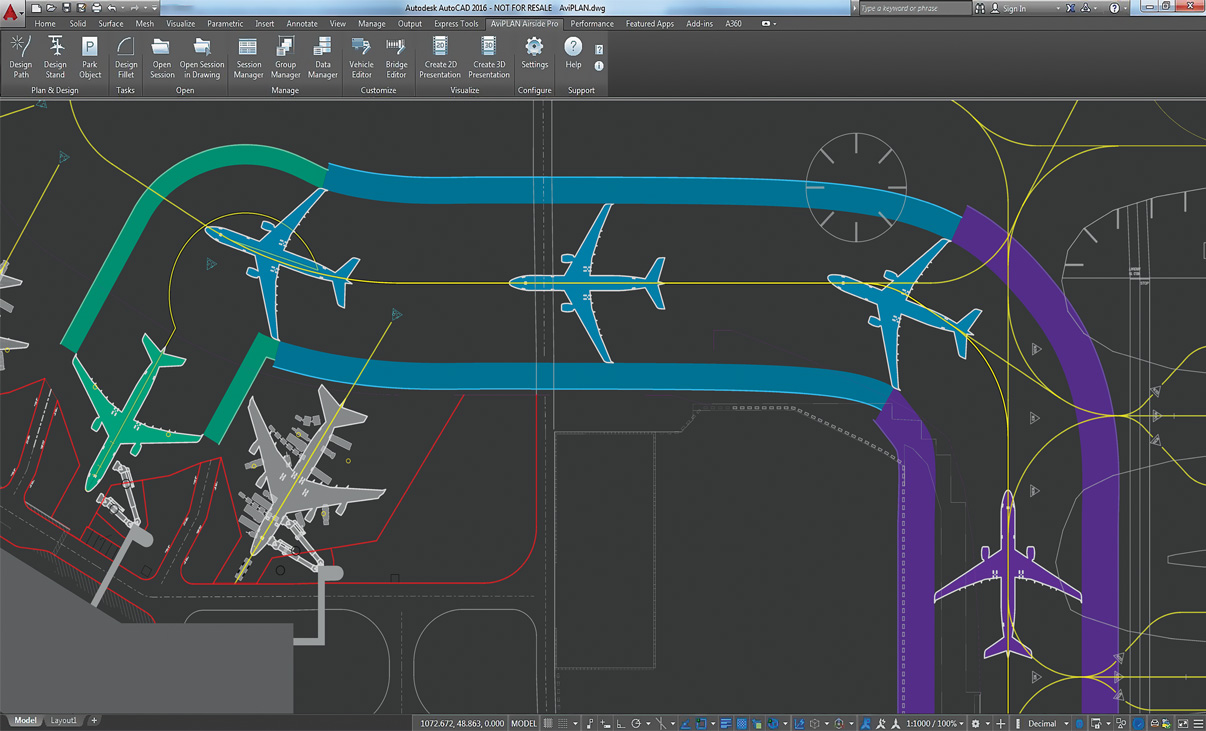
Airside Design Standards
Undertake clearance studies using taxi way, taxi lane and apron safety clearance guidelines from ICAO, FAA (ADG and TDG) and EASA.
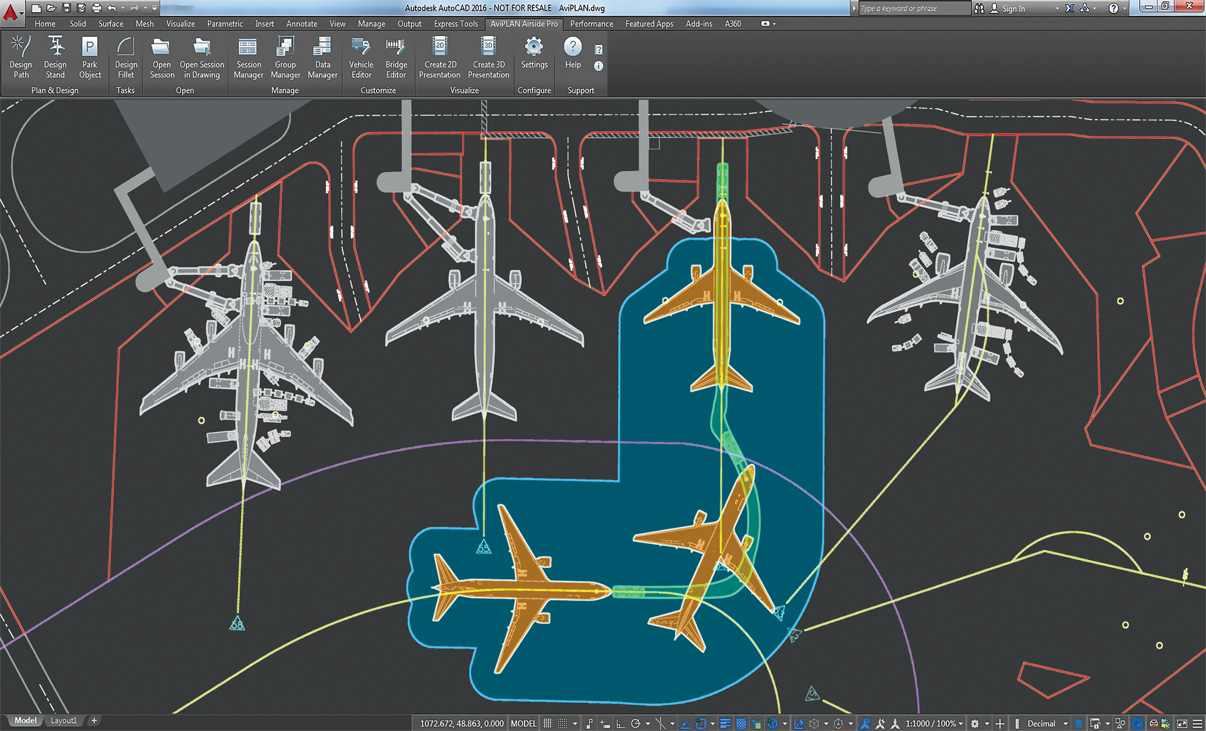
Accurate Pushback Maneuvers
The dependable path simulation algorithm allows users to accurately simulate complex airplane-towbar/towbarless tractor pushback maneuvers in 2D and 3D, for defining new or verifying existing operational procedures.
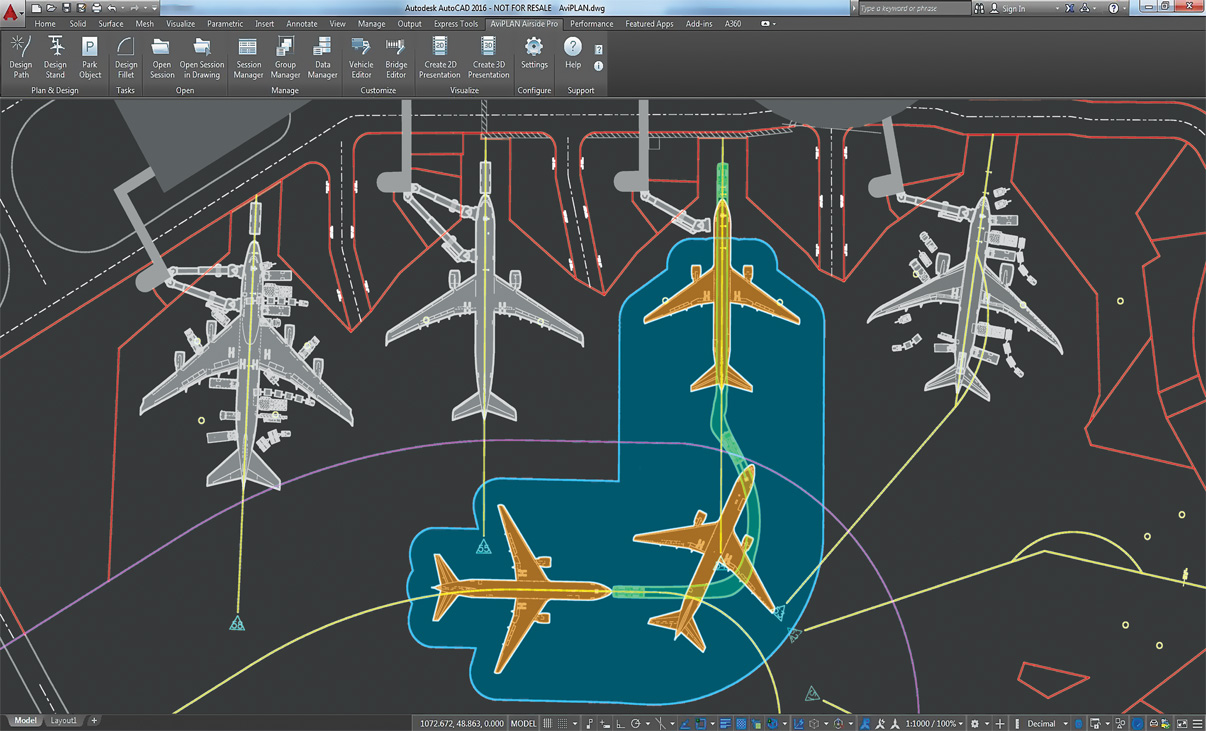
Accurate Pushback Maneuvers
The dependable path simulation algorithm allows users to accurately simulate complex airplane-towbar/towbarless tractor pushback maneuvers, for defining new or verifying existing operational procedures
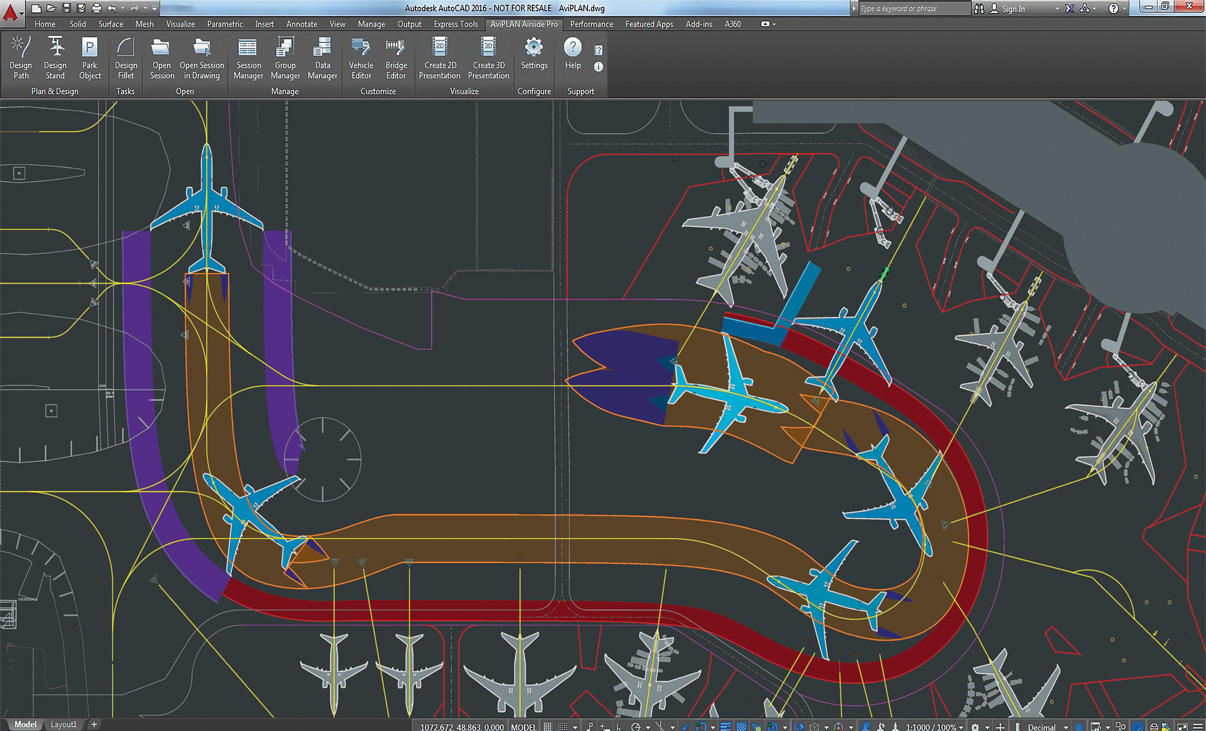
Safe Aircraft Maneuvering
Powerful maneuver simulation tools allow users to define and adjust parameters such as aircraft/vehicle type, turn types and angles, construction points and offsets, speeds and much more «on the fly».
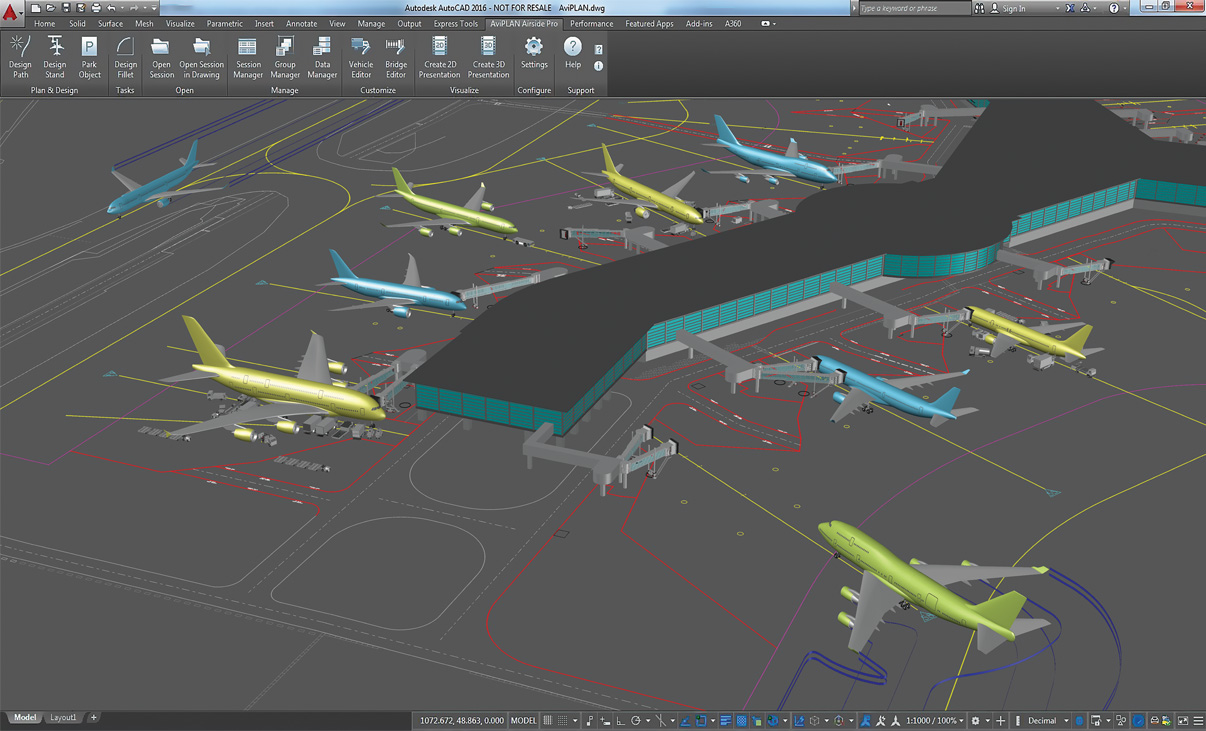
Reporting and Visualization
Convert technical aircraft maneuver and docking simulation analyses into professional movies in 2D and 3D. Ideal for visualizing complex technical results, illustrating capacity issues or simply adding credit to a stakeholder pitch.
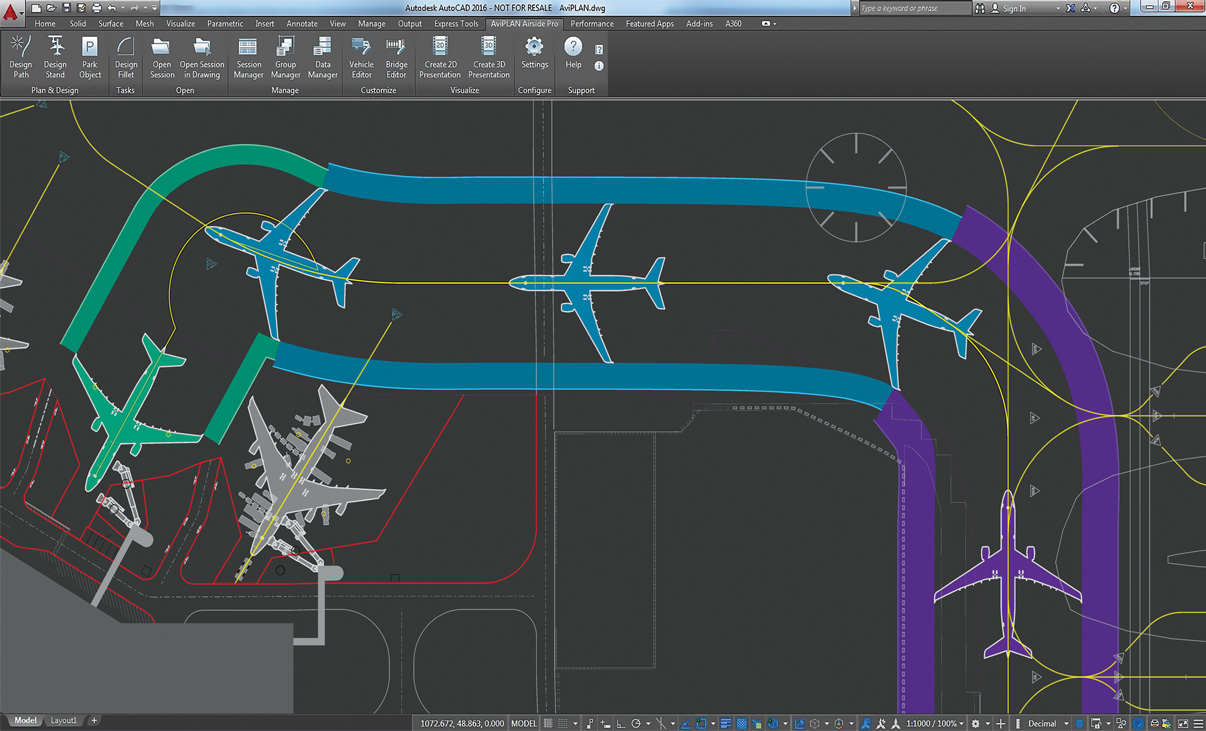
Airside Design Standards
Undertake clearance studies using taxi way, taxi lane and apron safety clearance guidelines from ICAO, FAA (ADG and TDG) and EASA.
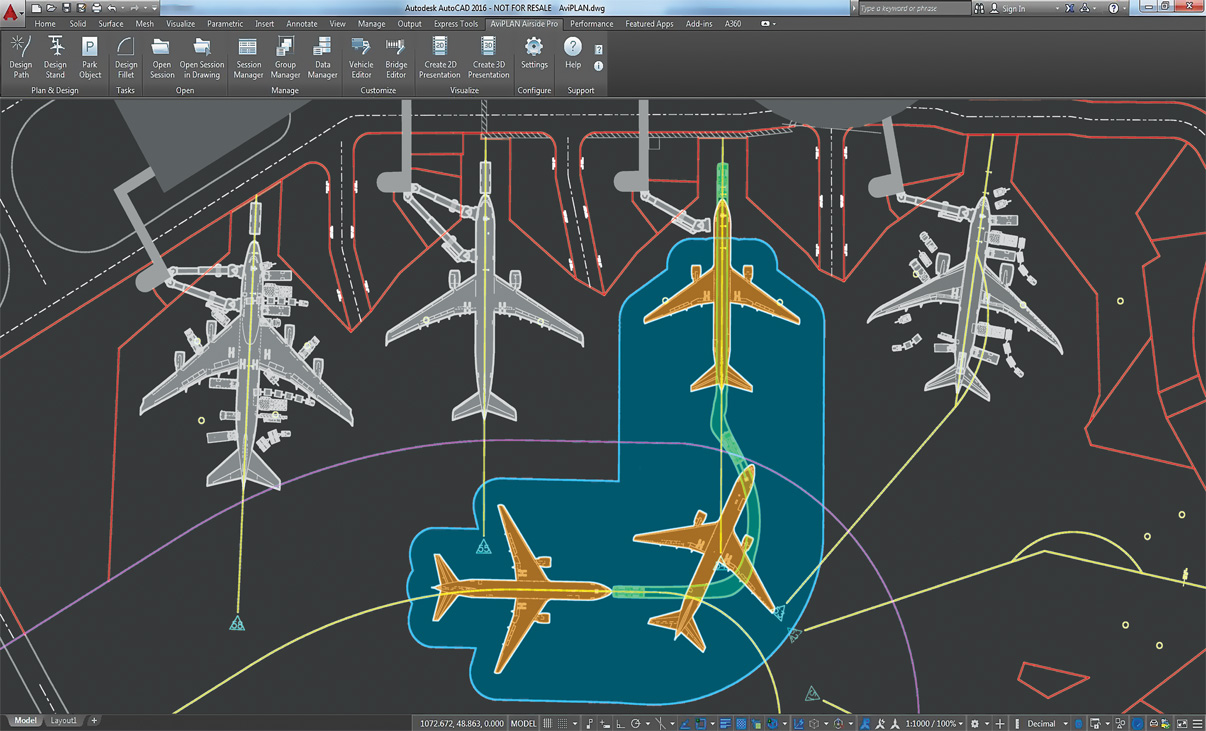
Accurate Pushback Maneuvers
The dependable path simulation algorithm allows users to accurately simulate complex airplane-towbar/towbarless tractor pushback maneuvers in 2D and 3D, for defining new or verifying existing operational procedures.
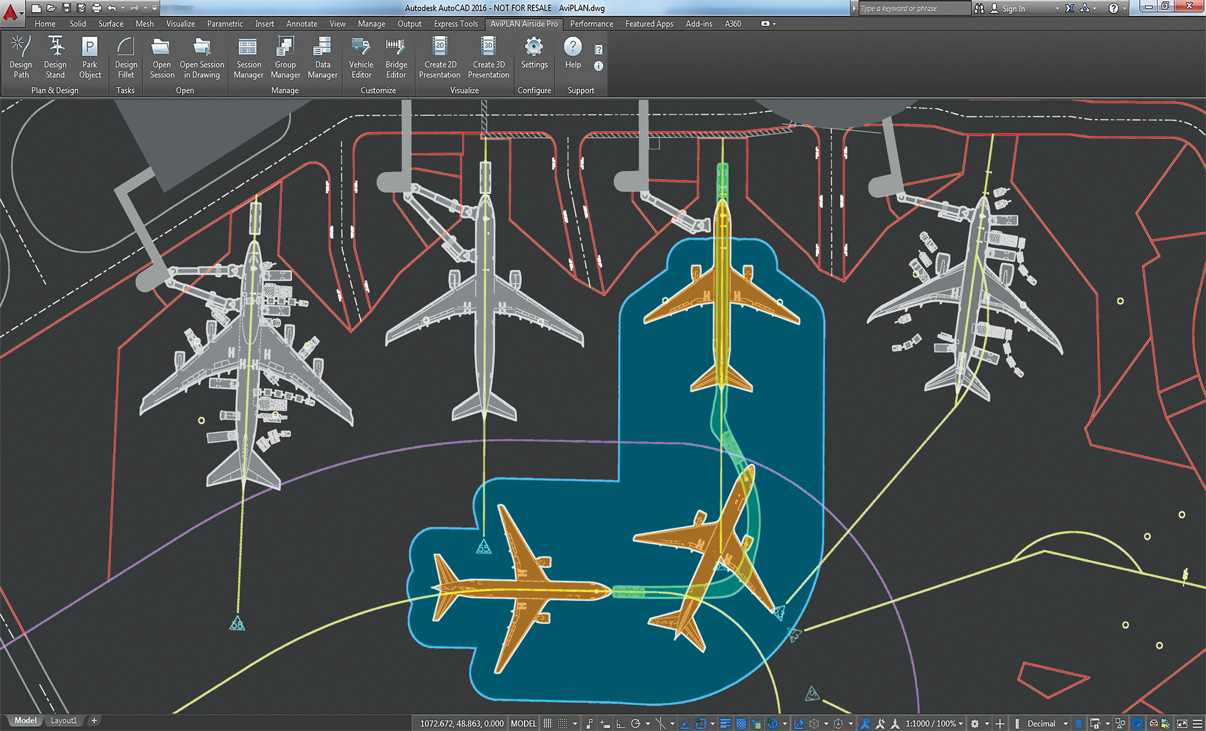
Accurate Pushback Maneuvers
The dependable path simulation algorithm allows users to accurately simulate complex airplane-towbar/towbarless tractor pushback maneuvers in 2D and 3D, for defining new or verifying existing operational procedures.
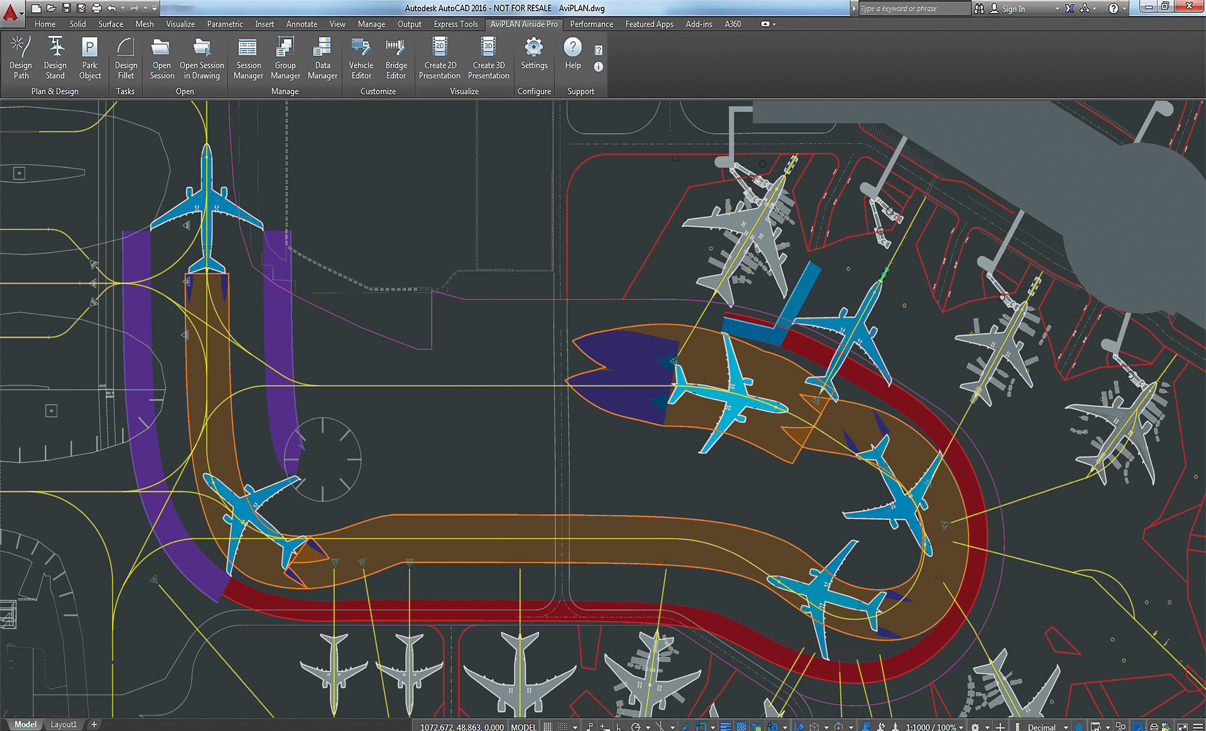
Safe Aircraft Maneuvering
Powerful maneuver simulation tools allow users to define and adjust parameters such as aircraft/vehicle type, turn types and angles, construction points and offsets, speeds and much more «on the fly».
What’s New in AviPLAN
New features, fixes, and other improvements built specifically with your feedback.
General
- AviPLAN is now compatible with AutoCAD and Civil 3D 2025.
Feature updates
- It’s now possible to dynamically display nose gear angle limits and usage during Path creation.
- A new footer/status bar has been added to the Stand command dialog, showing the count of airplanes with docking, and also if there are any warnings.
- When using Drawing Manager, in sessions with multiple airplanes, aircraft that are not displayed are now indicated in blue in the session column.
- For Object Selection, it is now possible to name and save filter and column configurations for easy repeated use.
This latest version is launched as AviPLAN 2024 as Transoft Solutions is adopting a new annual product versioning system. This new approach makes it easier to understand which version you are running to help ensure that you stay up to date with the latest features, improvements, and security patches.
Key features in this new release are:
- The new group lead-in command tool that saves you time by allowing rapid analysis of lead-in paths for all airplanes planned to use a stand, in just one single action.
- Integration of the service editor with the session manager to permit more heads-up planning.
- The new pilot ground blind spot element which assists in the placement of stand and taxiway markings.
- Improved capabilities for planning helicopter and VTOL parking at airports.
- UI enhancements for faster, more efficient workflows.
- A new data export connection to our recently-launched cloud-native platform AeroCENTRAL, which aims to bridge the gap between airside planning and operations.
- Refined and expanded conflict analysis – Now with apron safety line detection making it simpler to check regulation compliance at the stand and report to authorities.
- VTOL ready! – With the VTOL (vertical take-off and landing) aircraft now added to the AviPLAN library, simulate and design vertiports that are compliant with preliminary EASA and FAA guidelines on vertiport design.
New rotation option – Achieve flexible movement and rotation of stand lead-in lines around user-defined point or origin. - Improved TaxiBot path simulation – More accurately model pushback operations and procedures performed by this newer type of airplane mover.
- Plus much more – Improved user features, including new display settings for the stand airplane cloud, stand adjacency conflicts, and platform compatibility updates.
- Compatibility with Autodesk AutoCAD® and Civil 3D® 2023
- The latest FAA AC 150/5300-13B regulations (March 2022)
- The latest EASA CS-ADR-DSN Issue 6 regulations (March 2022)
- Improved regulation/session migration support and user feedback
- Stand | New airplane isolation/highlight function to expedite the iterative design process
- Fillet | New automatic selection of the airplanes’ longest effective wheelbase
- Group Manager | New functionality to add airplanes to groups by selecting existing sessions
- New and revised library objects and data from Airbus, Boeing, Gulfstream, TLD and more
- Latest ICAO Annex 14 Volume 1 8th Edition (Amendment 16) regulations
- Smart new features to start and complete tasks more quickly
- Totally overhauled tool for configuring passenger boarding bridges
- Algorithm refinements to improve usability and results
- New drawing options for taxiway and ground marking design
- Windows Media Video 9 support for movie creation
- New platform compatibility with Bricsys BricsCAD® V22
Licensing Options
Transoft offers a range of licensing options to help small, sole proprietorships right on up to the largest multinational organizations meet their transportation design and analysis needs.
La licence d’abonnement utilisateur est un modèle dans lequel un nombre défini d’utilisateurs abonnés se voient attribuer un accès dédié au logiciel via leurs identifiants uniques pendant la durée de la licence. Le logiciel peut être installé et utilisé par un Utilisateur Abonné sur plusieurs postes de travail.
Avantages des souscriptions utilisateurs
Les souscriptions permettent aux petites structures de commencer avec un utilisateur, puis d’en ajouter d’autres à moindre coût. De leur côté, les grandes entreprises bénéficient d’une plus grande souplesse de gestion et d’administration des utilisateurs via le portail My Transoft Portal. Outre une meilleure visibilité budgétaire, ces licences offrent l’évolutivité nécessaire pour adapter le nombre d’utilisateurs en fonction des besoins de l’entreprise.
Principaux avantages de la licence d’abonnement utilisateur
- Accès automatique aux mises à jour et nouveautés
Les mises à jour, les nouveautés et les bibliothèques sont importantes, mais pas toujours gratuites. Avec une licence utilisateur sur abonnement, vous bénéficiez automatiquement de correctifs, de mises à jour de compatibilité et de fonctionnalités optimisées, sans frais supplémentaires. - Plus grande évolutivité et meilleure gestion des équipements
À mesure que vos besoins évoluent, il vous faudra peut-être davantage de licences logicielles. En optant pour une offre sur abonnement, vous avez la possibilité d’ajouter des utilisateurs et de réattribuer des licences, ce qui permet de mieux maîtriser les coûts et les budgets, et d’opérer un reporting au niveau des utilisateurs. - Accès aux logiciels
Accédez à votre poste de travail, ordinateur portable ou ordinateur de bureau personnel. - Support technique illimité
Bénéficiez d’une assistance de qualité par téléphone ou par e-mail pour l’ensemble de vos déploiements et demandes de support technique. Vous pouvez même programmer une session d’assistance individuelle avec des spécialistes produit. - Invitations aux webinaires
Participez aux webinaires que nous organisons régulièrement. Ces sessions en direct sont une formidable occasion de découvrir comment nos logiciels peuvent simplifier votre processus de conception à moindre coût. - Formules de licence utilisateur souples
Bénéficiez de formules mono- et multi-utilisateur adaptées à l’évolution des besoins de votre entreprise. Contactez notre équipe commerciale pour plus de détails. - Administration simplifiée des utilisateurs
La gestion des utilisateurs peut être effectuée dans le portail My Transoft, via des liens d’invitation ou par l’authentification unique du fournisseur d’identité avec provisionnement des utilisateurs.
La licence sur abonnement d’équipe (TSL, Team Subscription License) est une option de licence qui s’adresse aux utilisateurs temporaires ou occasionnels du logiciel. La taille de ce type de licence est définie par le nombre de jetons attribuables.
Avantages des licences sur abonnement d’équipe
Contrairement aux licences utilisateur sur abonnement (USL, User Subscription License) qui s’adressent aux utilisateurs réguliers, les licences sur abonnement d’équipe sont destinées aux utilisateurs occasionnels de votre entreprise.
FONCTIONNEMENT
Chaque utilisateur d’une licence sur abonnement d’équipe doit posséder un compte sur le portail My Transoft pour pouvoir demander une licence. Un accès Internet est nécessaire pour cette opération.
Lorsqu’un utilisateur lance le logiciel sur son poste de travail, le programme se connecte au portail My Transoft et détermine s’il reste des jetons disponibles. Si c’est le cas, l’un d’eux lui est attribué pour une durée de 24 heures. L’utilisateur bénéficie alors d’un accès illimité à ce jeton pendant cette période. À l’issue des 24 heures, l’attribution du jeton expire automatiquement et un autre utilisateur peut le solliciter.
Lorsque tous les jetons de la licence sont attribués à un instant donné, aucun autre utilisateur ne peut utiliser cette licence jusqu’à ce qu’un jeton soit automatiquement libéré à la fin de sa période de 24 heures.
Principaux avantages de la licence d’abonnement d’équipe
- Gain de flexibilité pour vos équipes
Permet d’autoriser des utilisateurs occasionnels à accéder au logiciel sans avoir à acheter de licences dédiées. - Moins de tâches administratives pour l’IT
Accès simplifié aux logiciels pour les utilisateurs occasionnels : le personnel IT n’a pas besoin d’allouer les licences, ni de les transférer d’un individu à l’autre. Les utilisateurs gèrent eux-mêmes leurs licences, qui expirent automatiquement au bout de 24 heures. - Possibilité de combiner les abonnements d’utilisateur et d’équipe
Il est possible de combiner les deux modes de licence en fonction des besoins. - Mises à jour automatiques, nouveautés et contenu
Bénéficiez automatiquement de correctifs, de nouvelles versions ou de nouvelles directives de conception de véhicules. - Gestion aisée des besoins de votre entreprise
Bénéficiez d’une évolutivité hors pair et gérez efficacement. - Installation du logiciel et connexion en tout lieu
Accédez à votre poste de travail, votre ordinateur portable ou votre PC grâce à l’Authentification unique. - Support technique illimité
Bénéficiez d’une assistance de qualité pour l’ensemble de vos déploiements et demandes de support technique. - Invitations à des webinaires de formation
Participez à des webinaires animés par des spécialistes produit et découvrez comment nos logiciels peuvent simplifier vos processus de conception. - Administration simplifiée des utilisateurs
La gestion des utilisateurs peut être effectuée dans le portail My Transoft, via des liens d’invitation ou par l’authentification unique du fournisseur d’identité avec provisionnement des utilisateurs.
Transoft Support
We take pride in delivering complete customer satisfaction. Get help with products, downloads, technical support, and more.

My Transoft Portal
Transoft's product enhancements are periodically released to provide access to new features, fixes, and security updates. For many products, you can find these updates and download them directly from My Transoft Portal.

Software License Agreement
For information on terms and conditions detailing the usage of our software, please refer to Transoft’s Software License Agreement (SLA).

Software FAQ
Search our extensive product knowledgebase that address some of the most frequently asked questions regarding Transoft ‘s software.

Help Desk
Find answers to your issues on a variety of topics or request Technical Support. Get help with downloading and installing your software, managing your account, product compatibility and much more.

Licensing Options
Transoft offers a range of licensing options to help small, sole proprietorships right on up to the largest multinational organizations meet their transportation design and analysis needs.
Project Support Services
Need assistance with custom drawings and content creation related to your project design work? Transoft’s team of consultants can help. We deliver fast and helpful services for clients requesting additional assistance with drawings and simulations related to their project design work.
Compare
| AviPLAN Turn |
AviPLAN Turn Pro |
AviPLAN Airside |
AviPLAN Airside Pro |
|
|---|---|---|---|---|
Libraries |
||||
| Airplanes, helicopters and VTOLs | 2D | 2D & 3D | 2D | 2D & 3D |
| Pushback tractors and other service equipment | 2D | 2D & 3D | 2D | 2D & 3D |
| Passenger boarding bridges | 2D | 2D & 3D | ||
Customization |
||||
| Create custom vehicles | ✓ | ✓ | ✓ | ✓ |
| Define bridge-mounted services | ✓ | |||
Path |
||||
| Simulate aircraft and vehicle maneuvers | ✓ | ✓ | ✓ | ✓ |
| Follow CAD-lines or maneuver manually | ✓ | ✓ | ✓ | ✓ |
| Perform pushback and towing | ✓ | ✓ | ✓ | ✓ |
| Automated conflict detection | ✓ | ✓ | ||
Stand and Parking |
||||
| Park aircraft or vehicles | ✓ | ✓ | ✓ | ✓ |
| Design contact or remote stands | ✓ | ✓ | ||
| Specify bridge characteristics | ✓ | ✓ | ||
| Automate stop line creation | ✓ | |||
| Design with multiple bridges and lead-in lines | ✓ | |||
| Define airplane service installations | ✓ | |||
| Automated conflict detection | ✓ | |||
Airside Design |
||||
| Airplane and vehicle selection/sorting options | ✓ | ✓ | ✓ | ✓ |
| Automated taxiway intersection fillet design | ✓ | ✓ | ||
Display Elements |
||||
| Paths e.g. landing gear, engines, wing tips | ✓ | ✓ | ✓ | ✓ |
| Jet blast velocity contours and impact areas | ✓ | ✓ | ✓ | ✓ |
| ICAO, FAA, EASA or user-defined safety clearances | ✓ | ✓ | ✓ | ✓ |
| Airplane service points and service vehicles | ✓ | ✓ | ✓ | ✓ |
| In-ground service equipment incl. operational radius | ✓ | |||
Reporting |
||||
| Create text (.odt), spreadsheet (.csv) or in-drawing reports | ✓ | ✓ | ✓ | ✓ |
Animation and Visualization |
||||
| Animate aircraft and vehicle movements in CAD drawing | ✓ | ✓ | ✓ | ✓ |
| Create movie presentations with multiple simulations | ✓ | ✓ | ||
Data Management |
||||
| Export and share property templates for element display | ✓ | ✓ | ✓ | ✓ |
| Export and share custom objects | ✓ | ✓ | ✓ | ✓ |
| Import simulations from other drawings | ✓ | ✓ | ||
| Export and share simulations between CAD-platforms | ✓ | ✓ |
Training
We offer many excellent opportunities for you to take a more interactive approach in learning about our solutions. From webinars to how to videos, find what you need here.
AviPLAN Videos
Request a Quote
Thank you for your interest in AviPLAN. Fill out the form to receive information on purchasing and licensing options or if you have questions in general about the software.
On business days, you can expect a response within 24 hours of your request.