

Airside Infrastructure and Operations Management
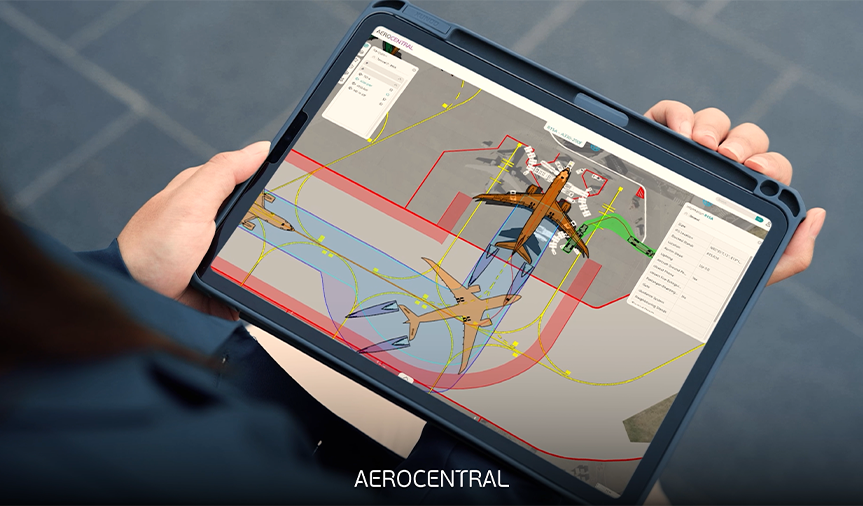
AeroCENTRAL™ is a Software as a Service (SaaS) platform for sharing key airside infrastructural and operational information in one easily accessible and centralized system. The scalable platform hosts specialized applications that are used for specific operational and technical planning tasks.
The first applications on the AeroCENTRAL platform, Stand Guide and Specifications, allow airports, airlines and ground service providers to present and access various aircraft parking stand configurations, equipment locations, turnaround procedures, or aircraft technical specifications, to support safer and more efficient decision-making.
AeroCENTRAL works by allowing users to incorporate their existing data with additional technical and operational data into one single platform. It’s possible to couple airside configurations, such as those planned in Transoft’s AviPLAN software, with supplemental data, such as turnaround procedures, routes, or stand equipment. With the ability to also connect to external GIS databases, Airport Operational Databases (AODB), or Safety Management Systems (SMS).

Publish, distribute, and view aircraft parking positions and associated operational information.

Comprehensive and up-to-date database of airplane and helicopter characteristics and dimensions.
Platform Compatibility
We strive to keep our products compatible with the latest operating systems and platforms. Find the latest product compatibility information for Transoft products.
English
What Makes AeroCENTRAL Unique
Improve collaboration and efficiency
Present and view airside operational information in a single location and remove the need for numerous information sources. Reducing data duplication and strengthening interactions between planners, operators, airlines, ground handlers and other stakeholders for better collaborative decision-making.
Save time and maximize convenience
Bring data into one easily accessible online platform and make it quicker to distribute and view necessary details, no matter where you are located. Whether you are an airport planner in an office or a service engineer on the apron, you use one interface to access the information. Maximizing convenience, saving time and reducing the need for extra resources.
24/7 availability
As a web-based platform, AeroCENTRAL is always available to office and on-the-ground teams. 24/7 operational readiness means even in unexpected circumstances users can still access the data.
Quickly set up and deploy
With no client-specific coding required, AeroCENTRAL applications are easy to populate and publish. The intuitive web and map interface means users of all experience and proficiency levels can use the tool with minimal training. User permission controls also ensure users only see information relevant to their duties.
What’s New in AeroCENTRAL
New features, fixes, and other improvements built specifically with your feedback.
General
The latest AeroCENTRAL update is now available, providing a more intuitive user experience. The update delivers language support for French and German, customizable global two-step verification (2SV), Stand Guide UI improvements , plus new features and platform enhancements.
Key features in this release include:
All Applications
Now Available in French and German
- AeroCENTRAL now supports French and German, providing a smoother experience for users in these languages
Customize 2SV Globally
- For more flexibility, administrators can customize 2SV by enabling, disabling, or setting it as optional for the whole domain
“Open in New Tab” Option Added
- Users can now open different applications in separate browser tabs to work more efficiently with multiple applications side by side
Manage Unified User Preferences
- Changes to user preferences can now be made outside of an application, making it easier to manage common settings
Stand Guide Application
Control Access with Custom Roles
- For more efficient user management, custom domain-specific roles can now be created to control access to Stand Guide data for various airports or projects
Improve Information Sharing with UI Update
- To further improve information sharing, updates to the Stand Guide Information Panel UI now allows direct editing of operational information
General
The September 2025 update of AeroCENTRAL is here, delivering improvements to integration and operational efficiency. This release introduces a new Application Programming Interface (API) and enhancements to Single Sign-On (SSO).
The new Application Programming Interface streamlines access to the platform, making it easier for clients to share Stand Guide information with external operational systems. Further visual upgrades in Stand Guide deliver quicker execution of operational tasks, with improved display of allocation effects on adjacent stands. Single Sign-On now supports additional identity providers, extending access to more users.
Key features in this new release are:
- New Application Programming Interface grants external systems access to Stand Guide data
- Single Sign-On now supports additional identity providers for smoother integration
Improved Features
Stand Guide
- Enhanced approval process ensures only verified data is available for the end user
- Allocation effects on adjacent stands can be visualized more clearly, simplifying operational tasks
General
The July 2025 update of AeroCENTRAL is here, delivering improvements aimed at enhancing user satisfaction. This release introduces Single Sign-On (SSO), streamlining access to the platform and simplifying its distribution within user organizations.
The Stand Guide application now features enhanced graphics management, making it easier to apply common visualization styles to various stands. Additionally, this update includes general bug fixes and performance enhancements for both the Specifications and Stand Guide applications.
Key features in this new release are:
- New Single Sign-On support simplifies access to the AeroCENTRAL platform
- The enhanced launch page now supports sharing airside status data and weather information
Improved Features
Stand Guide
- Azure Maps support has been added
- General enhancements to the graphics management and notification system
Improved Features
Specifications
- General bug fixes to improve user satisfaction
General
AeroCENTRAL May 2025 update is here delivering key new features, enhanced usability, and improved performance across the platform. This update includes general bug fixes and performance enhancements for both the Specifications and Stand Guide applications, ensuring a smoother and more reliable user experience.
Key features in this new release are:
- New Dark Mode feature improves usability across various environments and devices, and is now available throughout the entire AeroCENTRAL platform
New Features
Stand Guide
- The new Stand Creator tool allows users to replicate existing stands directly in Stand Guide, without the need for AviPLAN software
- The new Graphics Editor tool allows users to edit airplane graphical properties directly within Stand Guide, independent of those set in the received AviPLAN drawing data
Improved Features
Stand Guide
- General enhancements of Stand Guide now support a wider range of AviPLAN stand data, i.e. multi-docking scenarios
- During data import, AviPLAN drawing data can now be previewed directly on a map, which eases the approval process and enhances traceability
Improved Features
Specifications
- Helicopter and VTOL detail view panels have been enhanced with visualizations of an overall length dimension
- The process of selecting airplanes for comparison has been simplified and improved. Clicking on any item in the data grid adds the corresponding airplane to the comparison list
Licensing Options
Licensing is provided separately for each application; get in touch with us for additional details.
Transoft Support
We take pride in delivering complete customer satisfaction. Get help with products, downloads, technical support, and more.

My Transoft
Transoft's product enhancements are periodically released to provide access to new features, enhancements, fixes and security updates. For many products, you can find these updates and download them directly from My Transoft Portal.

Software License Agreement
For information on terms and conditions detailing the usage of our software, please refer to Transoft’s Software License Agreement (SLA).

Software FAQ’s
Search our extensive product knowledgebase that address some of the most frequently asked questions regarding Transoft ‘s software.

Help Desk
Find answers to your issues on a variety of topics or submit a service request to Technical Support. Get help with downloading and installing your software, managing your account, product compatibility and much more.

Licensing Options
Transoft offers a range of licensing options to help small, sole proprietorships right on up to the largest multinational organizations meet their transportation design and analysis needs.

Project Support Services
Need assistance with specialized drawings and custom content creation related to your project design work? Transoft’s team of consultants can help. We deliver fast and helpful services for clients requesting additional assistance with drawings and simulations related to their project design work.
Request a Quote
Thank you for your interest in AeroCENTRAL. Fill out the form to receive information on purchasing and licensing options or if you have questions in general about the software.
On business days, you can expect a response within 24 hours of your request.