

Comprehensive Solution for Roundabout Design & Analysis
TORUS® delivers a complete set of tools for roundabout design at its core. It provides everything you need; from automated initial geometry to analyzing the design’s safety and provides a solid foundation for your design.
Designed for all skill levels, TORUS makes your job easier, and more efficient by simultaneously balancing guidelines, safety and operation.
TORUS takes an innovative approach of generating roundabout geometries using vehicle swept path movements. This method minimizes complicated iteration cycles in the design process and lets you focus on engineering designs by eliminating taxing calculations, repetitions, and iterations. Streamline your process with dynamic feedback, making each iteration nearly effortless.
Simplify your roundabout design with automated initial geometry to analyze the safety of the design.
Platform Compatibility
We strive to keep our products compatible with the latest operating systems and platforms. Find the latest product compatibility information for Transoft products.
English, French, German
What Makes TORUS Unique?
Delivering the best geometric design with dynamic editing
Generate your initial geometry by using the design vehicle with immediate dimensional and analytical guidance which allows you to reach project goals and design objectives faster and safer.
Instant conformity notifications
TORUS lets you adjust your design on the fly and provides instant notifications, advising you if you’re staying within the design guidelines or on any potential design errors and inconsistencies.
Built-in design guidelines
Our Design Guidelines tool controls the design vehicles, clearance offsets, and parameters for the fastest path and sight lines at the start of the roundabout design process.
TORUS supports a multitude of design guidelines and standards and even lets you make your own guidelines.
Design a variety of roundabouts
Efficiently design circular and non-circular roundabouts, one lane or multi-lane, to address special constraints such as right of way, utilities and other infrastructure.
Comprehensive design and editing functions
Easily drag and place elements while dynamically updating the design. Simply add and set leg parameters such as entries/exits, offsets, widths, bypass lanes, and curb rounding.
Modify various elements of your splitter islands like radii, offsets and more.
Visualize the impact with 3D modeling and assemblies
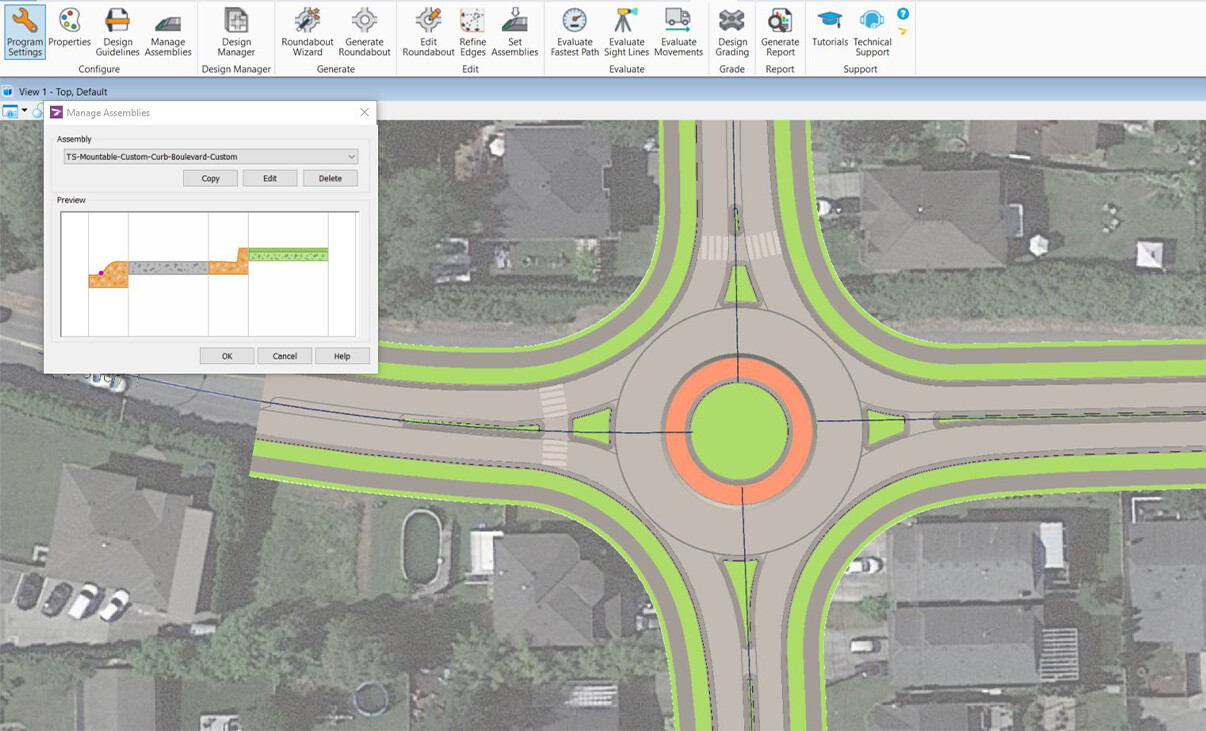
Design your complex projects with easy 3D modeling and visualizations, and add assemblies to your roundabout (shoulder, boulevard, sidewalk, curb and gutter).
Design for safer infrastructure
Ensure your design allows for speed consistency by using the Fastest Path Analysis tool to calculate the fastest paths and speeds.
Generate various sight lines like approaches to crosswalks, yield lines, circulatory lanes, and more, to ensure your design allows enough time and distance for drivers to react to obstacles.
Reporting tools
Create and insert the Fastest Path Analysis, Curve Tables, and Summary Reports with all design information to finish your design.
Reduce your iteration cycle and use the Design Manager to report and display multiple roundabout iterations for review and comparison.
Features
More Than Just Polylines and Shapes
TORUS provides more than just drafting tools – it streamlines your roundabout geometric design with integrated safety analysis to ensure your project reaches optimal design without the hassle of reworking manual calculations with each iteration.
You can stay focused on delivering the best design option as timely as possible with dynamic editing, whereby all components of your roundabout adjust to accommodate your design edits and provide instant notifications advising you if you’re staying within design guidelines.
Explore Features
Generate Roundabout
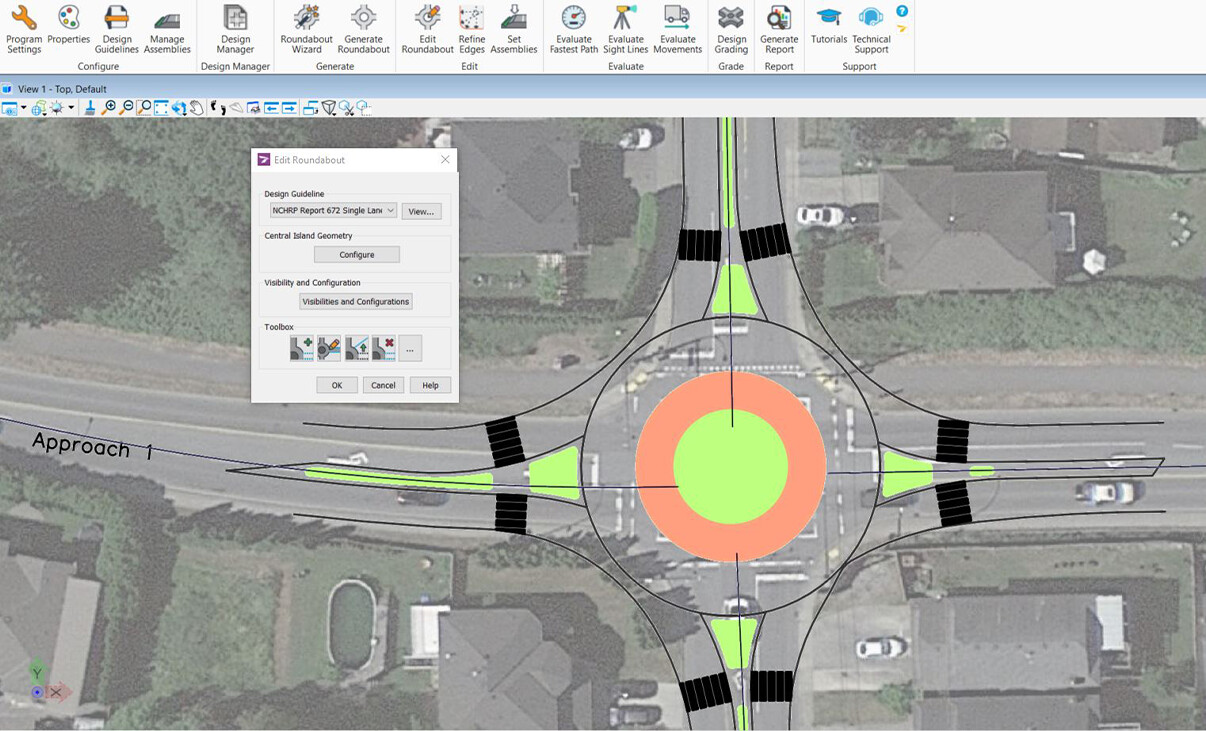
Generate your roundabout geometry based on your design vehicle right from the start.
TORUS generates the initial geometry using the vehicle swept path method – This method minimizes complicated iteration cycles in the design process by providing immediate dimensional and analytical guidance for the ICD, central island diameters, vehicle movements and clearance offsets.
Built-In Design Guidelines
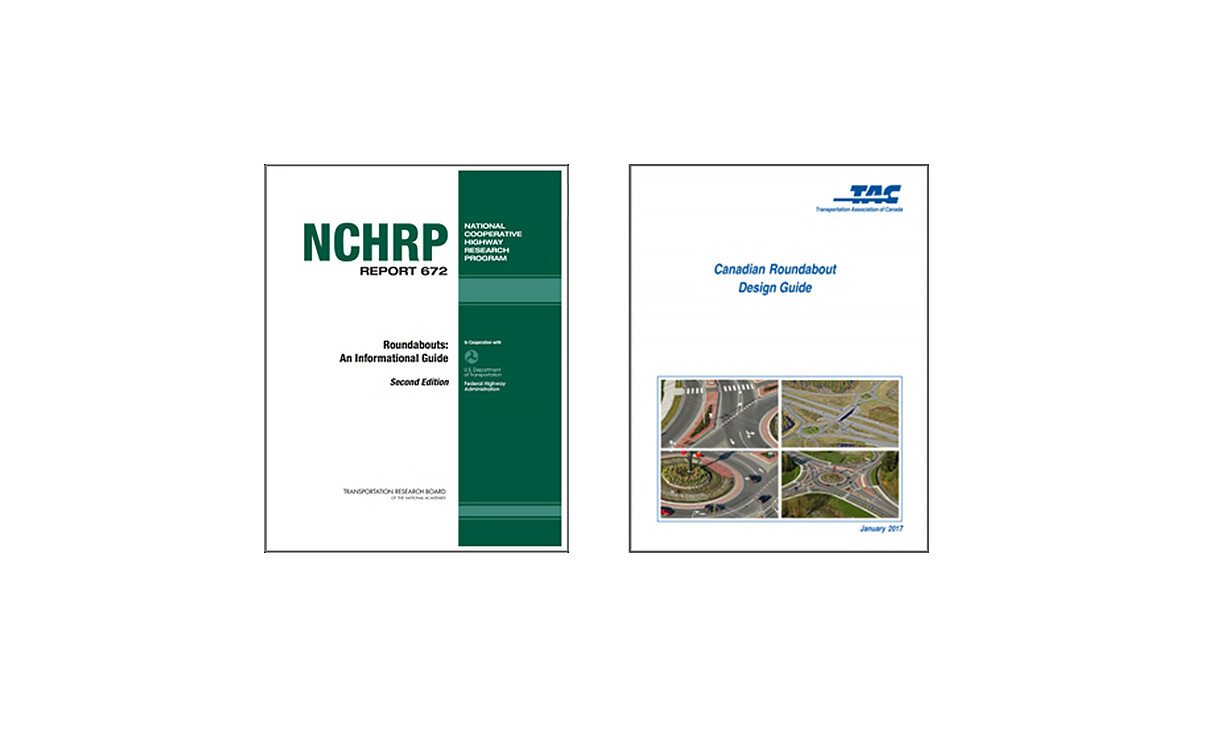
Our Design Guidelines tool controls the design vehicles, clearance offsets, and parameters for the fastest path and sight lines at the start of the roundabout design process.
TORUS supports a multitude of design guidelines and standards:
- High Speed Approach defined by FDOT
- NCHRP 672
- FHWA 2010
- TAC 2017
- Austroads 2018
You can also create new roundabout design guidelines and edit, rename, or delete existing ones.
Design a Variety of Roundabouts
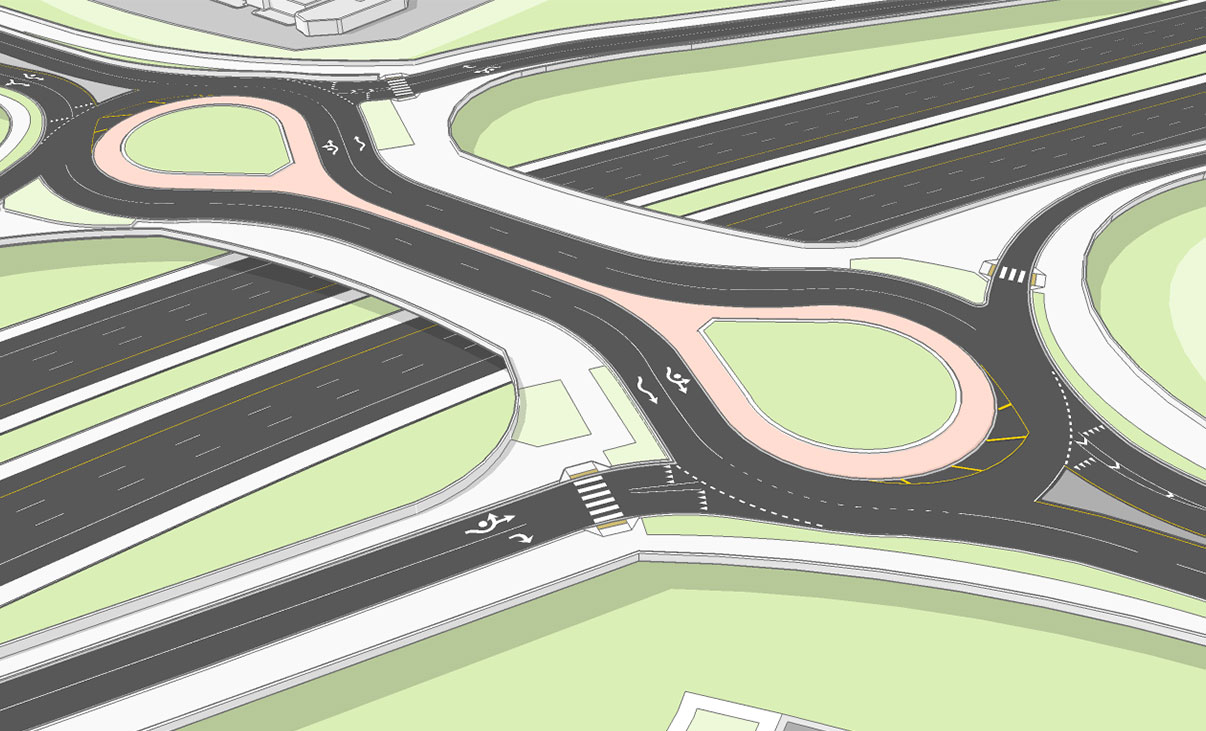
Efficiently design circular and non-circular roundabouts – Elliptical, teardrop, dog-bone, peanut, one lane or multi-lane, to address special constraints such as right of way, utilities and other infrastructure.
Design a turbo roundabout, with its key geometric elements that provides a spiraling flow of traffic, requiring drivers to choose their direction before entering the roundabout.
Outer and Custom Truck Apron
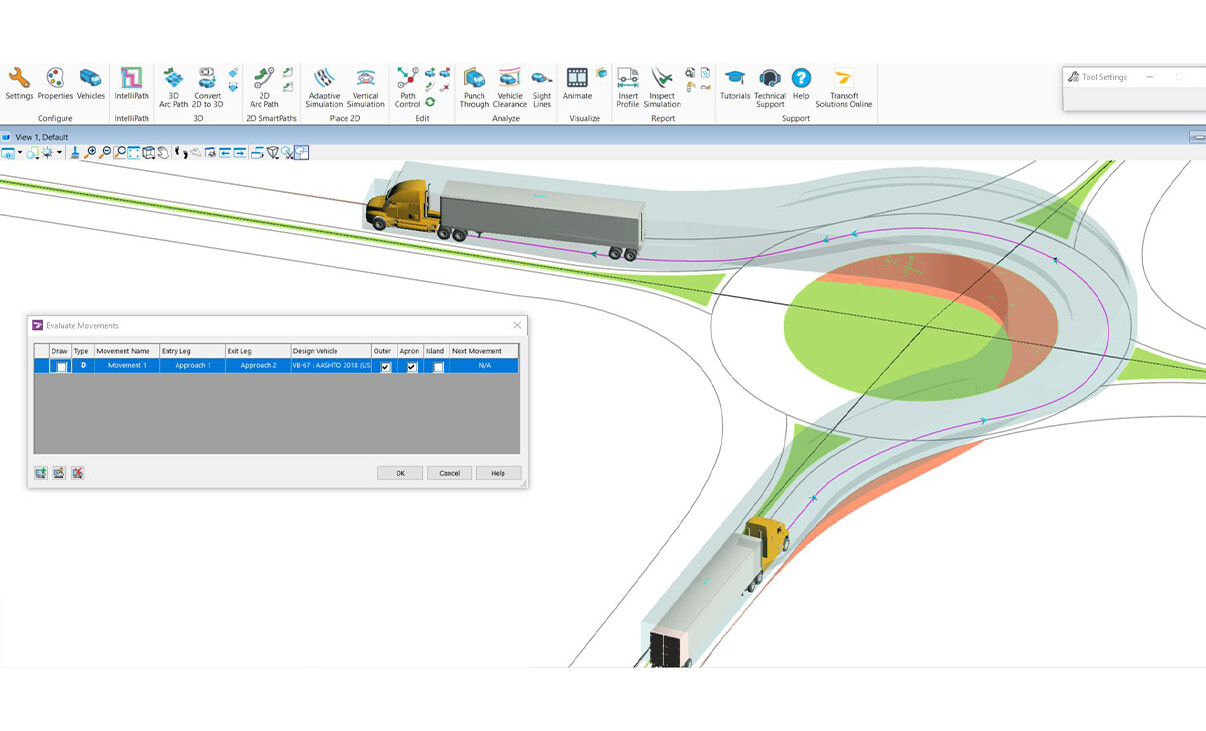
Provide additional traversable area around the central island apron and around the outside entry and exit lanes to allow larger vehicles room to navigate your roundabout without striking fixed objects or other road users.
3D Modeling and Grading
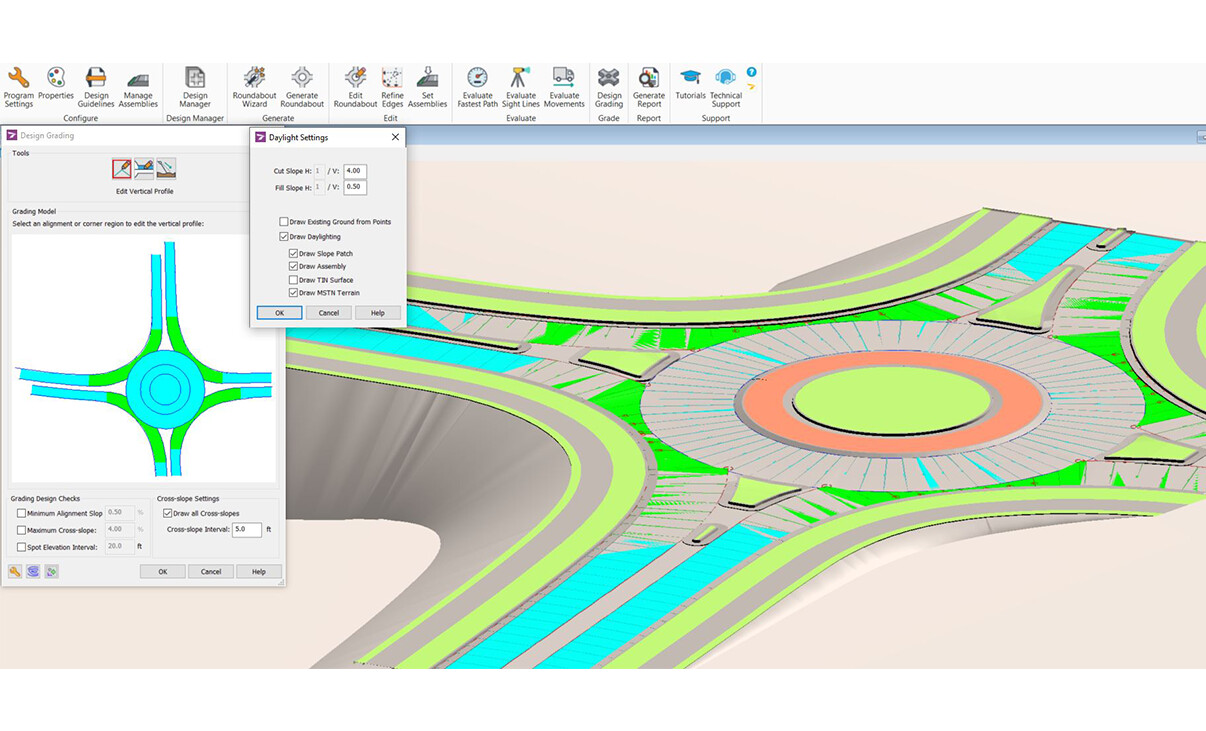
Create a 3D model quickly to ensure that the design intent is confirmed early in the design process by incorporating terrain elevation and the swept paths with its vehicle clearance data together in the project drawing. Issues not anticipated when designing in a 2D plane are now detected and can be resolved using a 3D space, therefore preventing costly damage to vehicles and the roundabout.
Visualize the Impact With Assemblies
Design your complex projects with easy 3D modeling and visualizations, and add assemblies to your roundabout (shoulder, boulevard, sidewalk, curb and gutter). TORUS’ new functionality easily stitches together components such as curbs, truck aprons, sidewalks, splitter islands to generate a realistic 3D roundabout model.
Advanced 3D Grading and Terrain Modeling
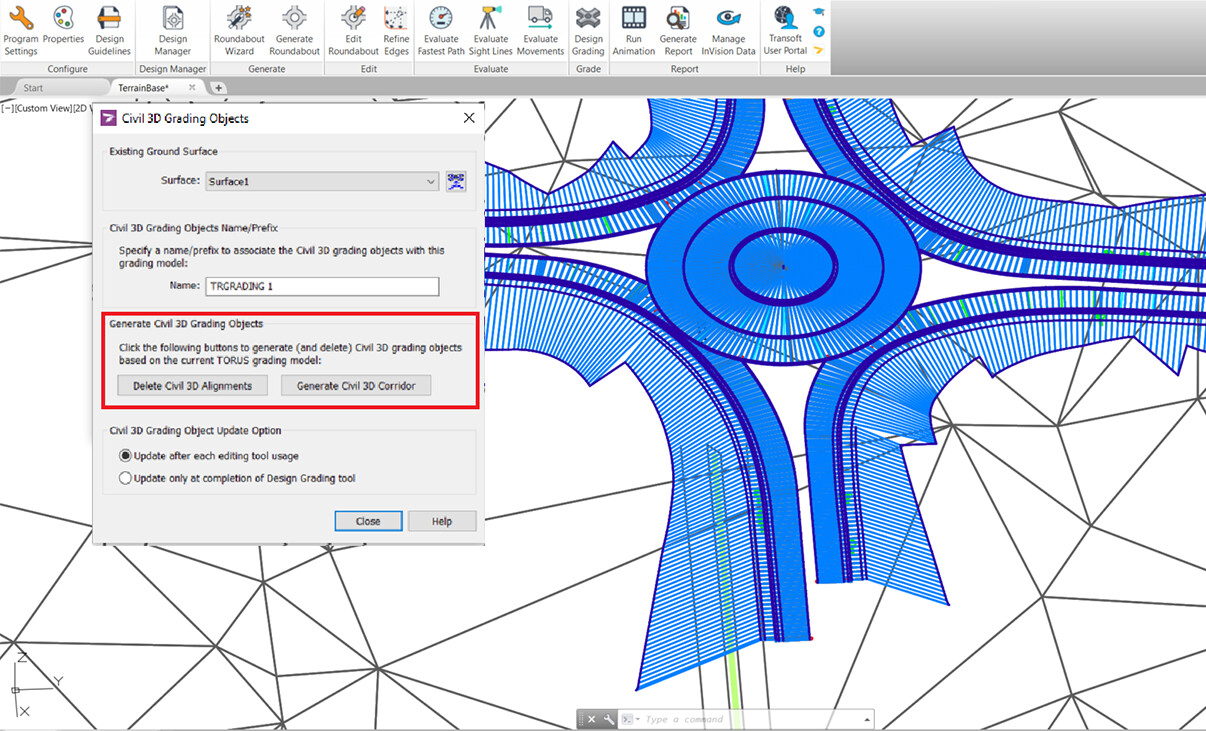
Go further with your road design by generating a 3D grading and terrain model to view profiles, super elevation and more. Tie the 3D model back into your existing terrain with ease to see how your design fits with the existing infrastructure and submit your completed design for construction.
Comprehensive Design and Editing Functions
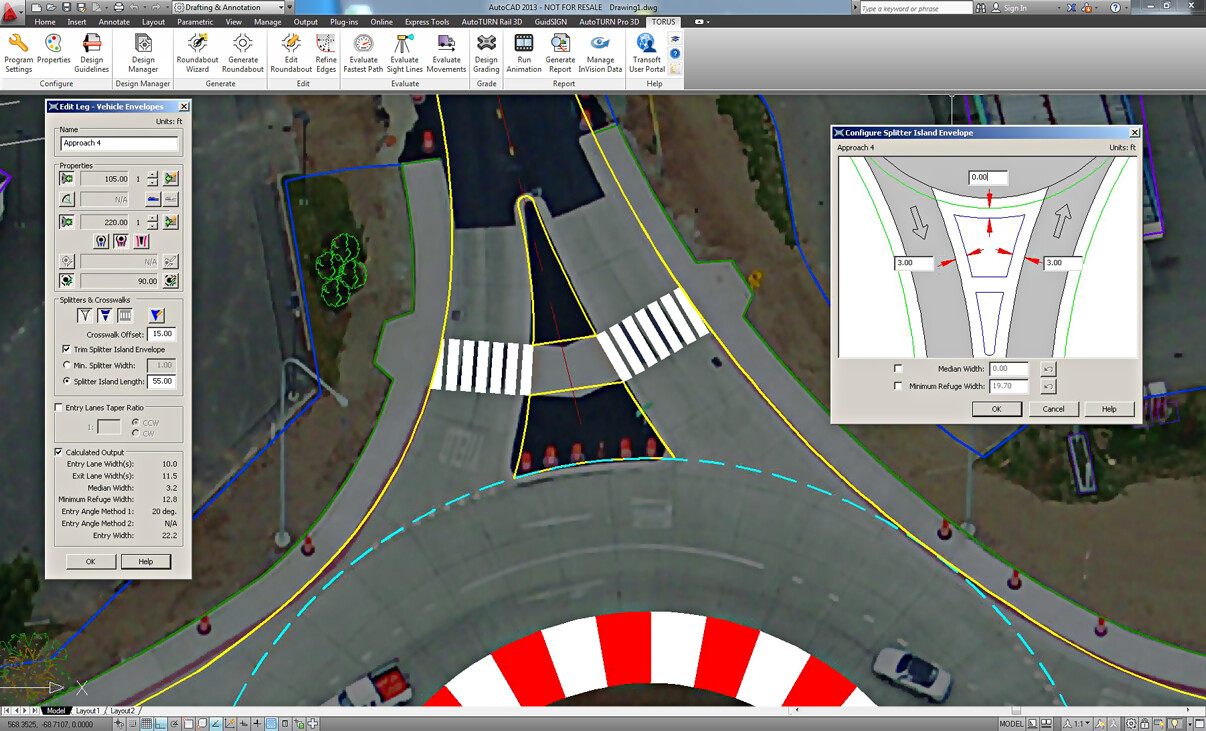
With its complete set of design and editing tools, you can easily drag and place elements while dynamically updating the design. Simply add and set leg parameters such as entries/exits, offsets, widths, bypass lanes, and curb rounding. Torus updates automatically any analysis already performed.
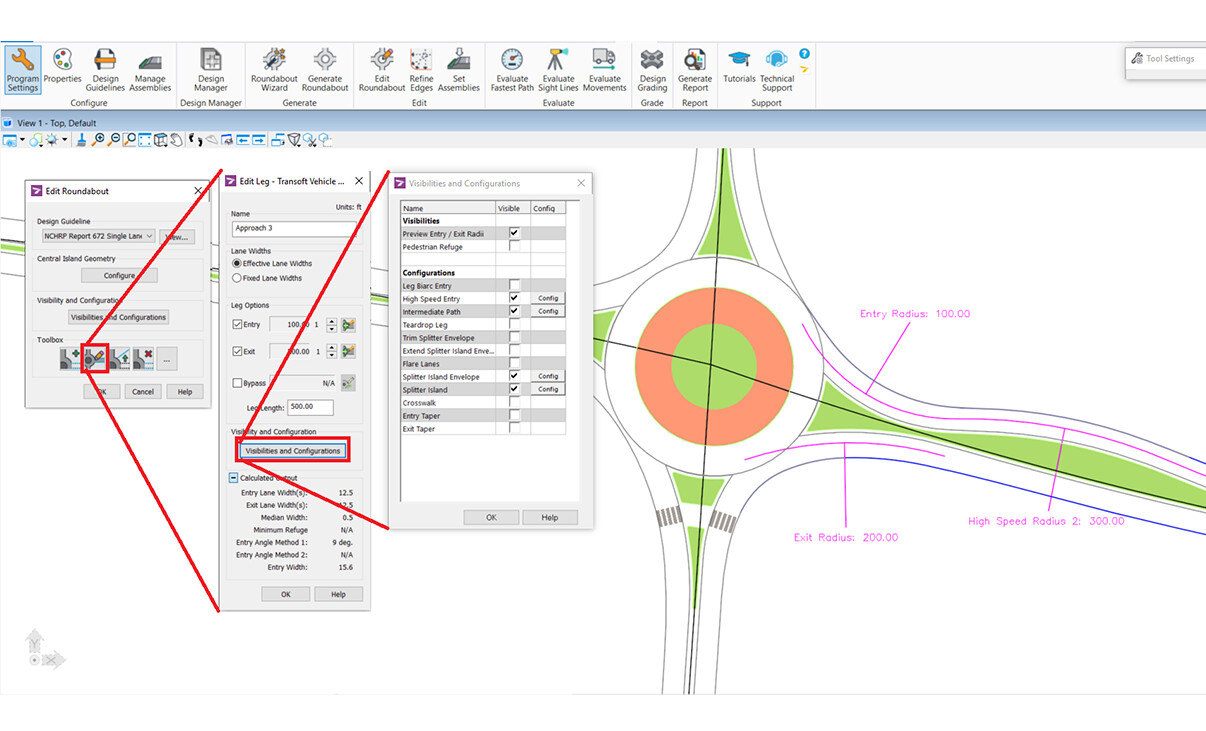
Instant Conformity Notifications
Streamline your design process with dynamic feedback, making each iteration nearly effortless by simultaneously letting you design and edit the geometry while balancing guidelines, safety, and operation. TORUS provides instant notifications advising you if you’re staying within design guidelines or on any potential design errors and inconsistencies.
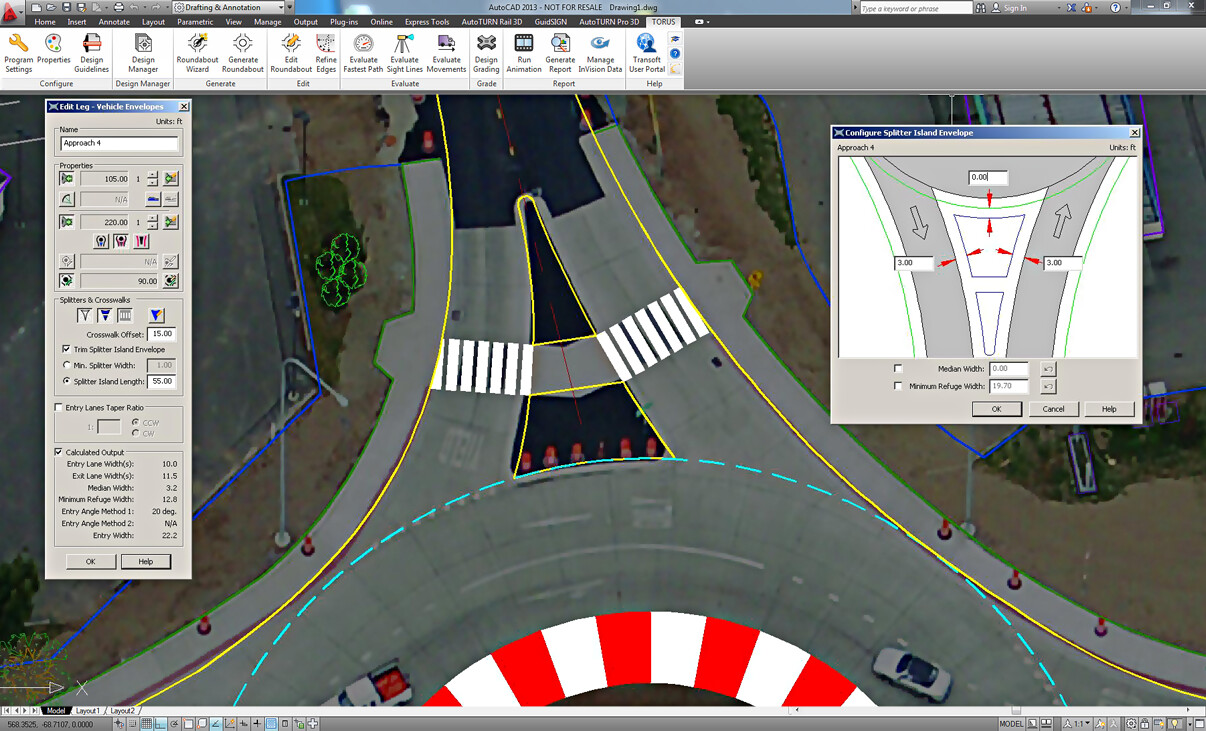
Modify Various Elements of Your Geometry
Edit elements of your splitter islands like radii, offsets and more. Extent Splitter islands to facilitate movements in multi-lane designs by directing vehicles into the appropriate circulating roadway lanes. With the Refined Edge tool, draw lines and arcs, which can be fine-tuned to closely represent the final edges of your roundabout.
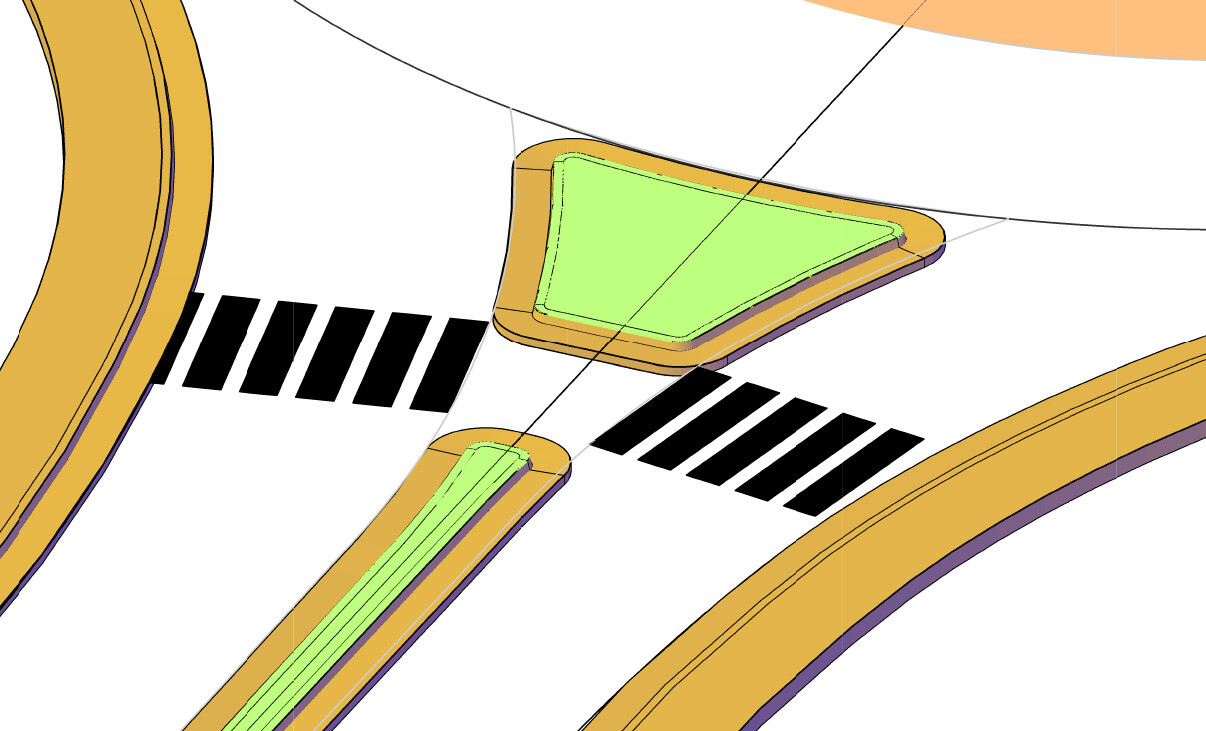
Crosswalk and Pedestrian Refuge
Introduce pedestrian refuge space to make your design safer for vulnerable road users. Align your Crosswalk with your edge of road and change the offset from the yield line to your Crosswalk.
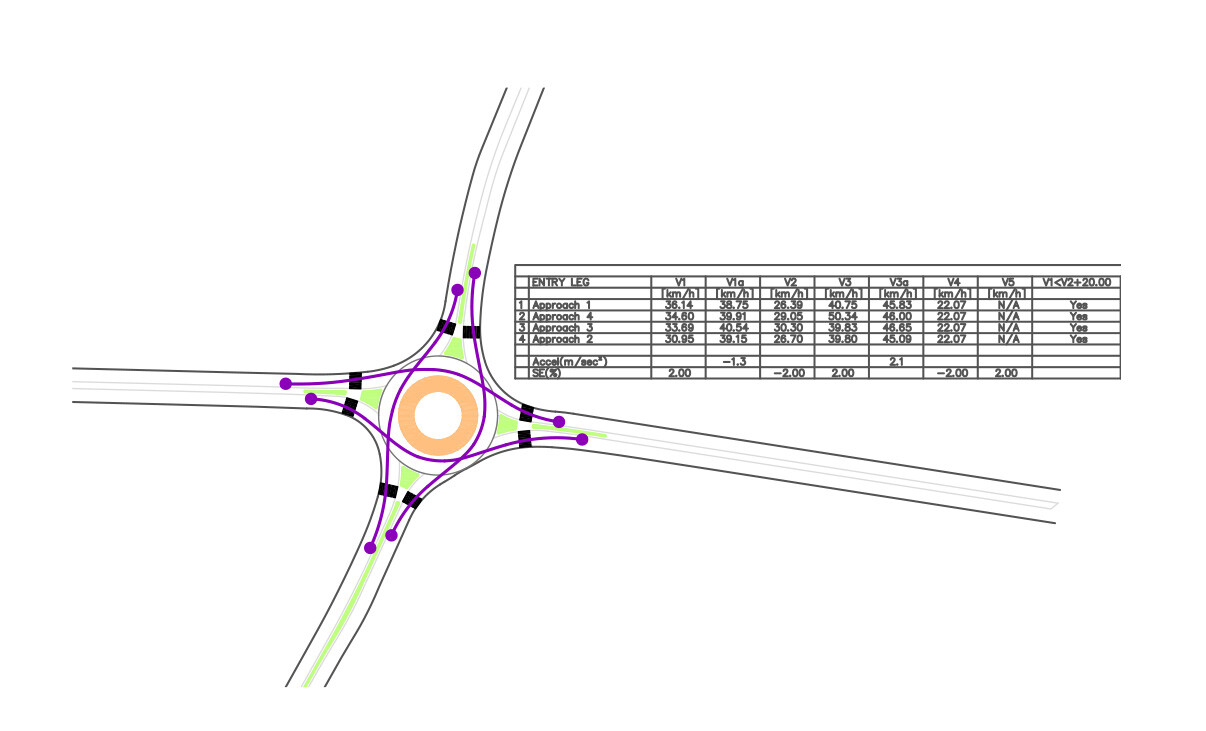
Fastest Path Evaluation
Ensure your design allows for speed consistency by using the Fastest Path tool to calculate the fastest paths and speeds. TORUS recalculates speeds on every adjustment of the geometric design so you can see the impacts to speed & safety in an instant.
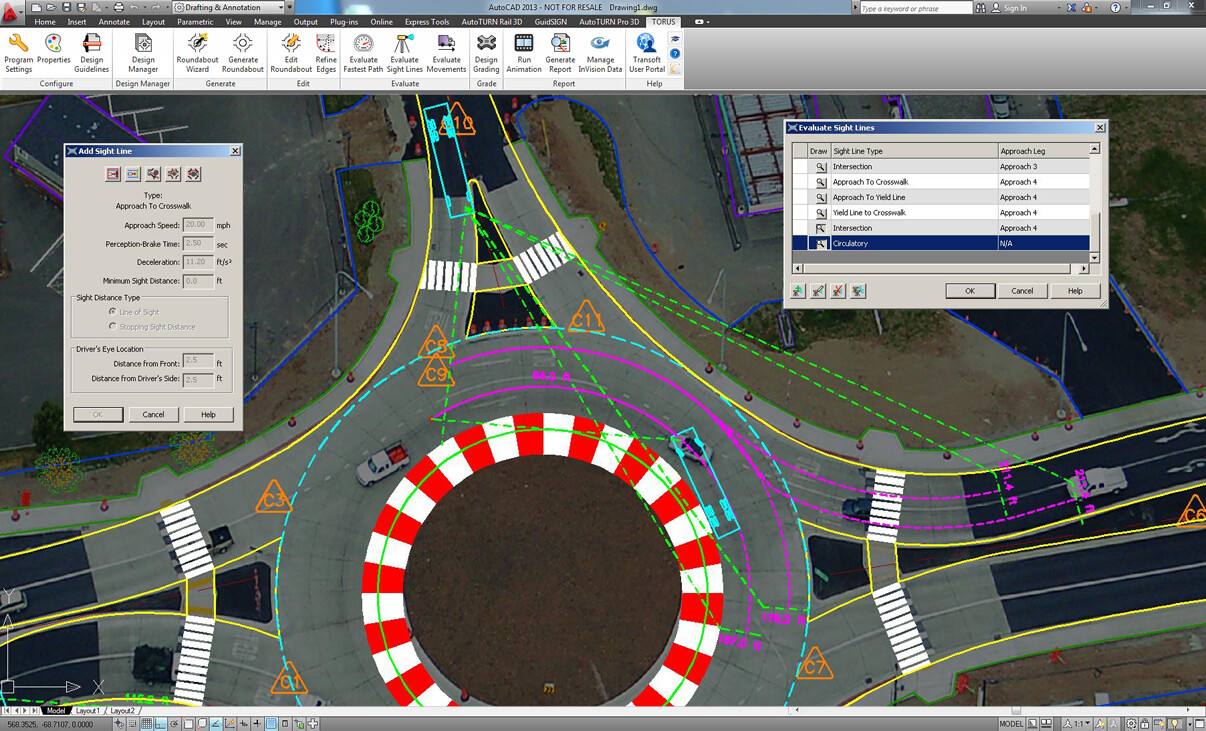
Sight Line Controls and Visibilities Evaluation
To promote driver safety and generate various sight lines that check the angle of visibility or sightlines- approaches to crosswalks, yield lines, circulatory lanes, and more to ensure your design allows enough time and distance for drivers to react to obstacles.
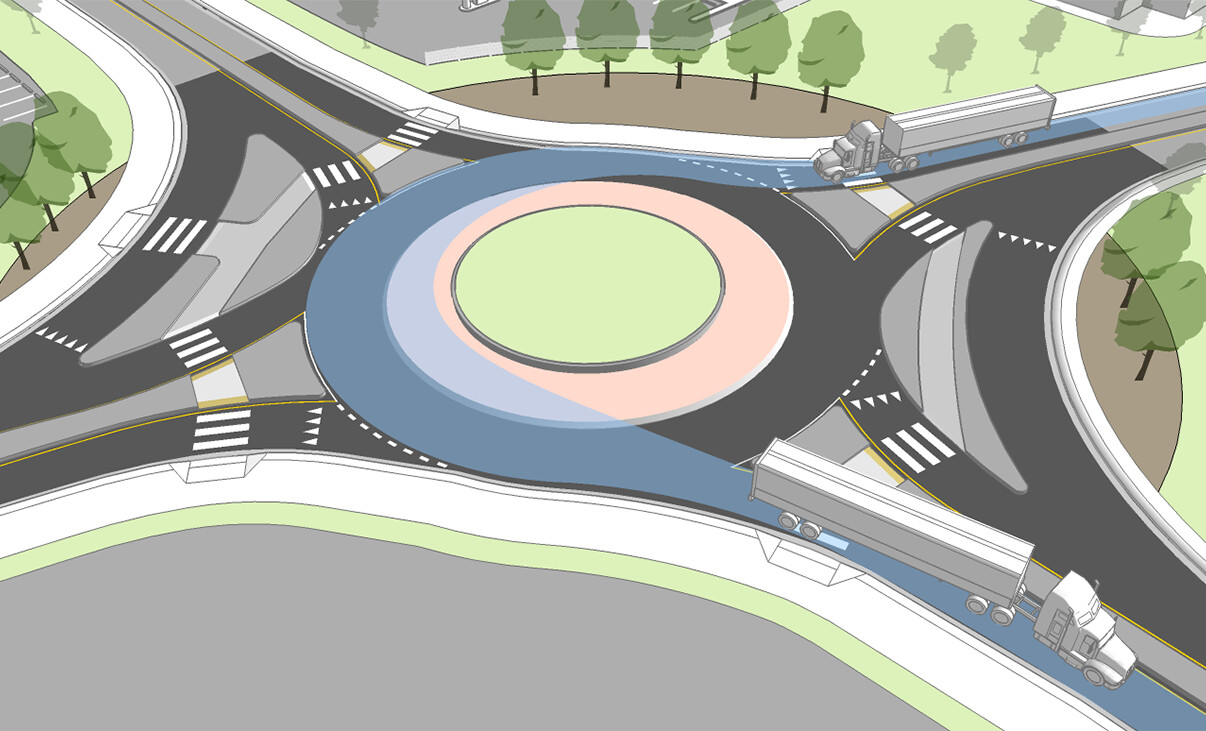
Design Vehicle(s) Accommodation Analysis
Analyze if the roundabout’s dimensions accommodate the largest design vehicle(s) likely to use the roundabout on a regular basis, including the turning path requirements of this vehicle. Easily add, view, edit, and delete AutoTURN® vehicle movements specified in the current design guidelines, or switch out to a special transport vehicle and check if it can access the roundabout safely.
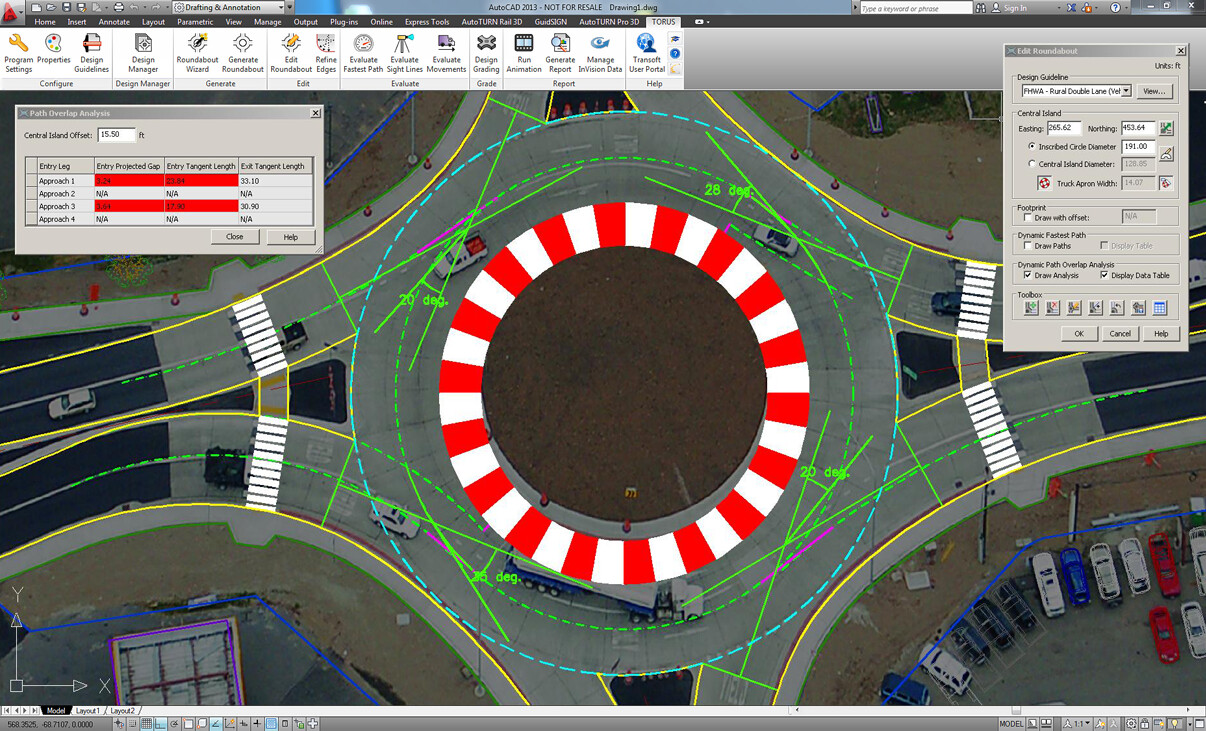
Path-overlap Analysis for Multi-lane Roundabouts
With TORUS it is easy to simulate vehicle movements within the roundabout by analyzing and displaying the vehicle path overlap. Using TORUS’ Path Overlap Analysis, it detects and analyzes if the natural paths of vehicles in adjacent lanes may overlap. This feature gives you the necessary feedback to highlight this type of vehicle conflict for multi-lane roundabout design.
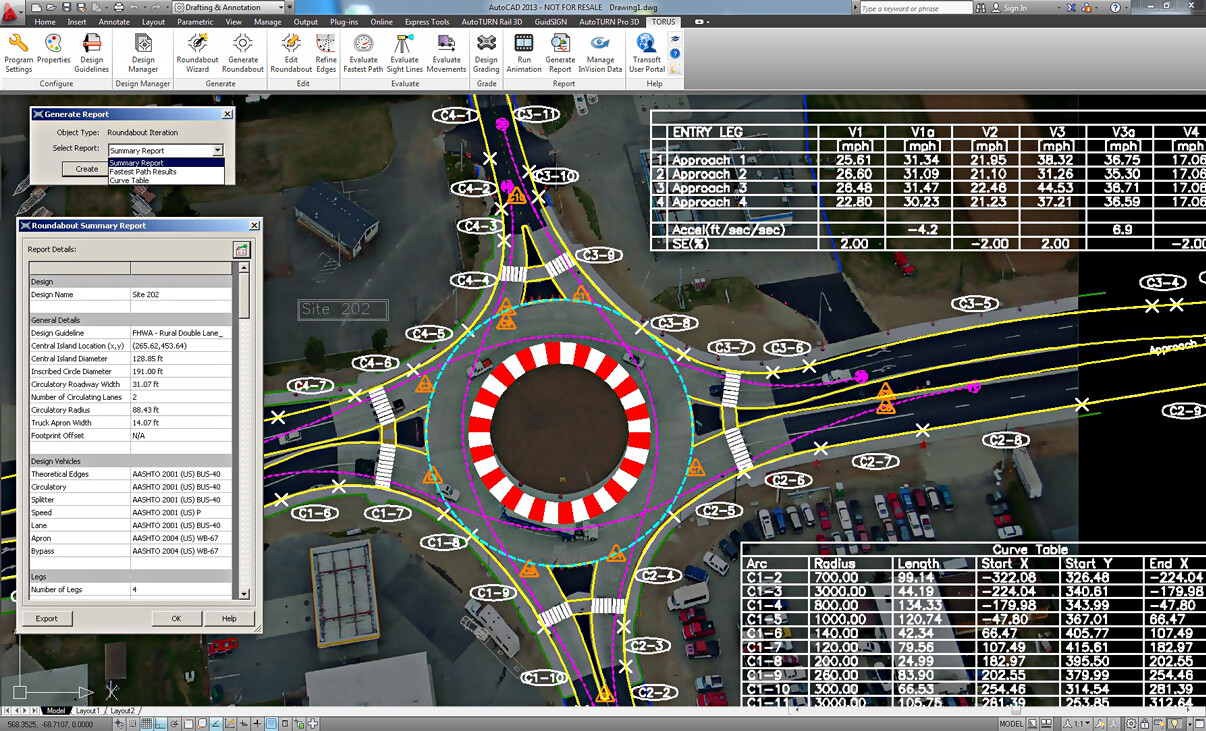
Roundabout Reporting Tables
Create and insert Summary Reports with all design information into the CAD drawing or export it to csv or text format files. Create and insert the Fastest Path Analysis, Curve Tables, Turning Movement Reports and Summary Reports with all design information to finish your design.
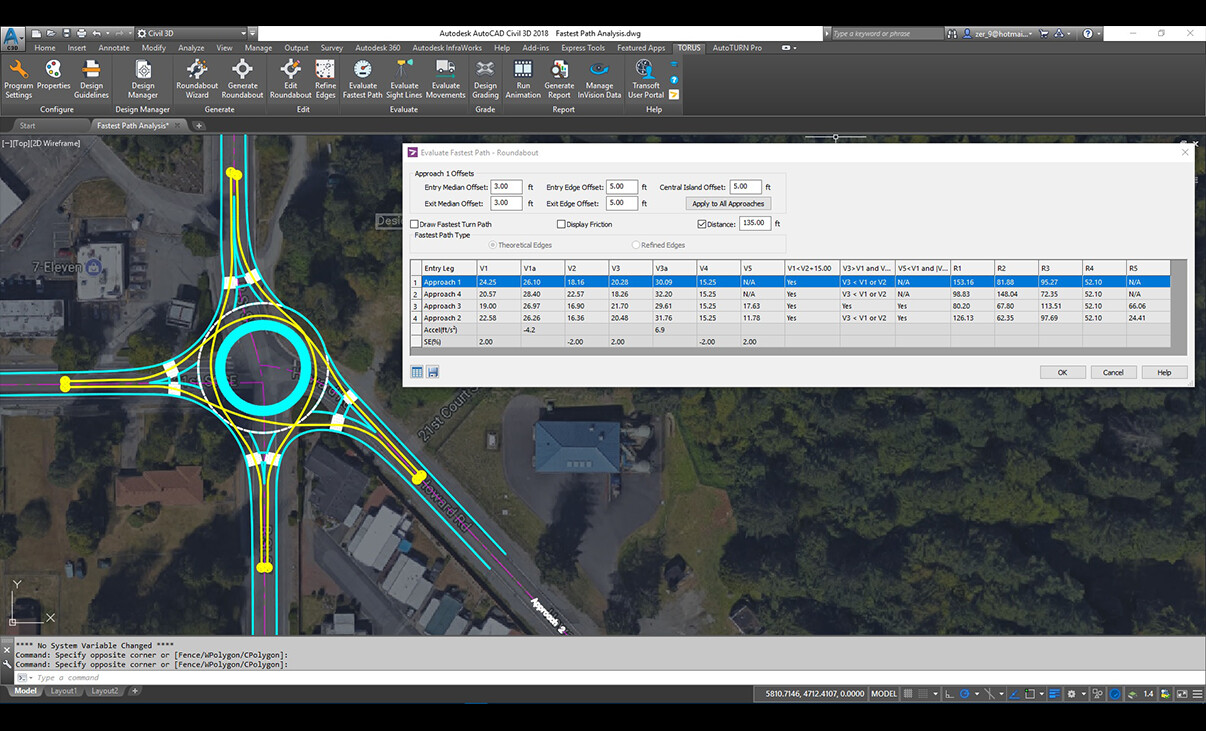
Fastest Path Results and Curve Table
Fastest Path Results Table contains radius and speed data on the roundabout. Curve Table consists of a curve table and a line table for the data on the roundabout’s refined edges.
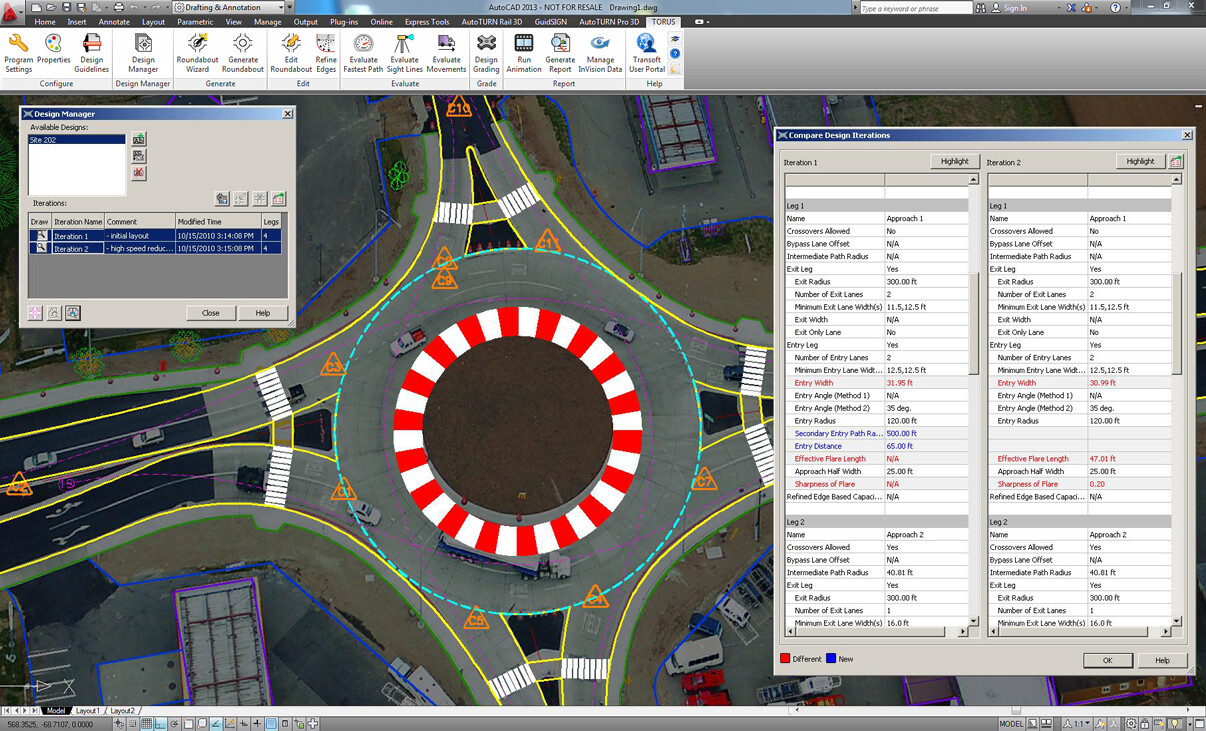
Design Manager
Reduce your iteration cycle and use the Design Manager to create, track and explore more roundabout design options. TORUS allows you to save, recall, and display multiple roundabout iterations for review and comparison.
What’s New in TORUS
New features, fixes, and other improvements built specifically with your feedback.
Get all the benefits of the latest release by upgrading your software.
Compatibility for:
- Autodesk® AutoCAD® 2015 – 2024 (except AutoCAD LT)
- Autodesk® Civil 3D® 2015 – 2024 alignments
- Bentley® MicroStation® V8i (SS4 and up), CONNECT® (Update 12 and up)
- Bentley® OpenRoads Designer CONNECT
Licensing Options
Transoft offers a range of licensing options to help small, sole proprietorships right on up to the largest multinational organizations meet their transportation design and analysis needs.
User Subscription License (USL) is a model where a set number of Subscribed Users are assigned dedicated access to the software through their unique logins for the duration of the license term. The software can be installed and used by a Subscribed User on multiple workstations.
Each Subscribed User represents one individual and their login and password, which cannot be shared with other users. Software activation is an easy process and can be done over the Internet.
Why Choose the USL Option
User Subscription License offers a cost-effective way for small businesses to start with one user and grow by adding additional users. For larger organizations, it will offer more flexibility in user administration and management via the My Transoft Portal. Furthermore, it can easily handle scalability and budgeting as per the business needs defined by the number of users.
Key Benefits of USL License
- Automatic updates, new features, and content
Bug fixes, compatibility, and new version releases. - Easily manage your changing business needs
With enhanced scalability and user management. - Install the software and log in from anywhere
Access your workstation, laptop, or personal desktop. - Unlimited technical support
Receive premium assistance for all your deployments and technical support needs. - Invitations to learning-focused webinars
Attend learning-focused webinars from our product experts and learn how our software can help streamline design processes. - Flexible user license options
Choose from single to multiple user packages to meet your business needs. - Simple user administration
User Management can be performed in the My Transoft Portal, via invitation links or by Identity Provider Single Sign-on with User Provisioning.
Have more questions about USL? See the FAQ here.
Team Subscription License (TSL) is a license option that is intended to support casual or occasional users of the software. The size of a TSL is represented as a number of allocatable seats.
Why Choose the TSL Option
While User Subscription Licenses are better for dedicated users, Team Subscription Licenses can be a good complement to these if your organization has occasional, less heavy users of the software.
How it Works
Each user of a TSL must have an account in the My Transoft Portal to request a license. Internet access is required for this process.
When an end user starts the software product on their workstation, the software will connect to the My Transoft Portal and will determine if any of the seats are available. If a seat is available, it will be allocated and dedicated to that end user who will have unrestricted access to it for 24 hours. At the end of the 24-hour period the seat allocation will automatically expire, and another user will be able to claim it.
Once all the TSL seats are allocated at a given time, no other end user will be able to use that license until the 24-hour period expires and one of the seats is automatically deallocated.
Key Benefits of TSL
- More flexibility for your team members
Allows access to software for casual users without having to spend on dedicated licenses for all users. - Less administrative effort by IT
Easy access to software for casual users without IT having to allocate or transfer licenses amongst team members, self-administered by users with automatic 24-hour lock. - Combined Team & User Subscription option
Flexibility of mixing plans according to the needs of different user types. - Automatic updates, new features, and content
Bug fixes, compatibility, new version releases, or vehicle guidelines are automatically available to you. - Easily manage your changing business needs
With enhanced scalability and user management. - Install the software and log in from anywhere
Access your workstation, laptop, or personal desktop with Single Sign-on. - Unlimited technical support
Receive premium assistance for all your deployments and technical support needs. - Invitations to learning-focused webinars
Attend learning-focused webinars from our product experts and learn how our software can help streamline design processes. - Simple user administration
User Management can be performed in the My Transoft Portal, via invitation links or by Identity Provider Single Sign-on with User Provisioning.
Transoft Support
We take pride in delivering complete customer satisfaction. Get help with products, downloads, technical support, and more.

My Transoft Portal
Transoft's product enhancements are periodically released to provide access to new features, fixes, and security updates. For many products, you can find these updates and download them directly from My Transoft Portal.

Software License Agreement
For information on terms and conditions detailing the usage of our software, please refer to Transoft’s Software License Agreement (SLA).

Software FAQ
Search our extensive product knowledgebase that address some of the most frequently asked questions regarding Transoft ‘s software.

Help Desk
Find answers to your issues on a variety of topics or request Technical Support. Get help with downloading and installing your software, managing your account, product compatibility and much more.

Licensing Options
Transoft offers a range of licensing options to help small, sole proprietorships right on up to the largest multinational organizations meet their transportation design and analysis needs.
Training
We offer many excellent opportunities for you to take a more interactive approach in learning about our solutions. From webinars to how to videos, find what you need here.
TORUS Videos
Request a Quote
Thank you for your interest in TORUS Roundabouts. Fill out the form to receive information on purchasing and licensing options or if you have questions in general about the software.
On business days, you can expect a response within 24 hours of your request.